Genio AI Developer Guide
Important
For the most comprehensive collection of pre-trained models, real-world performance benchmarks, and end-to-end deployment tutorials, please visit the official IoT AI Hub.
The Genio AI Developer Guide provides a comprehensive resource for building, optimizing, and deploying artificial intelligence workloads on MediaTek Genio IoT platforms. By utilizing the NeuroPilot (NP) software stack, developers can leverage dedicated hardware accelerators, including the Deep Learning Accelerator (MDLA) and Video Processing Unit (VPU), to achieve high-performance edge AI inference.
Core Concepts and Architecture
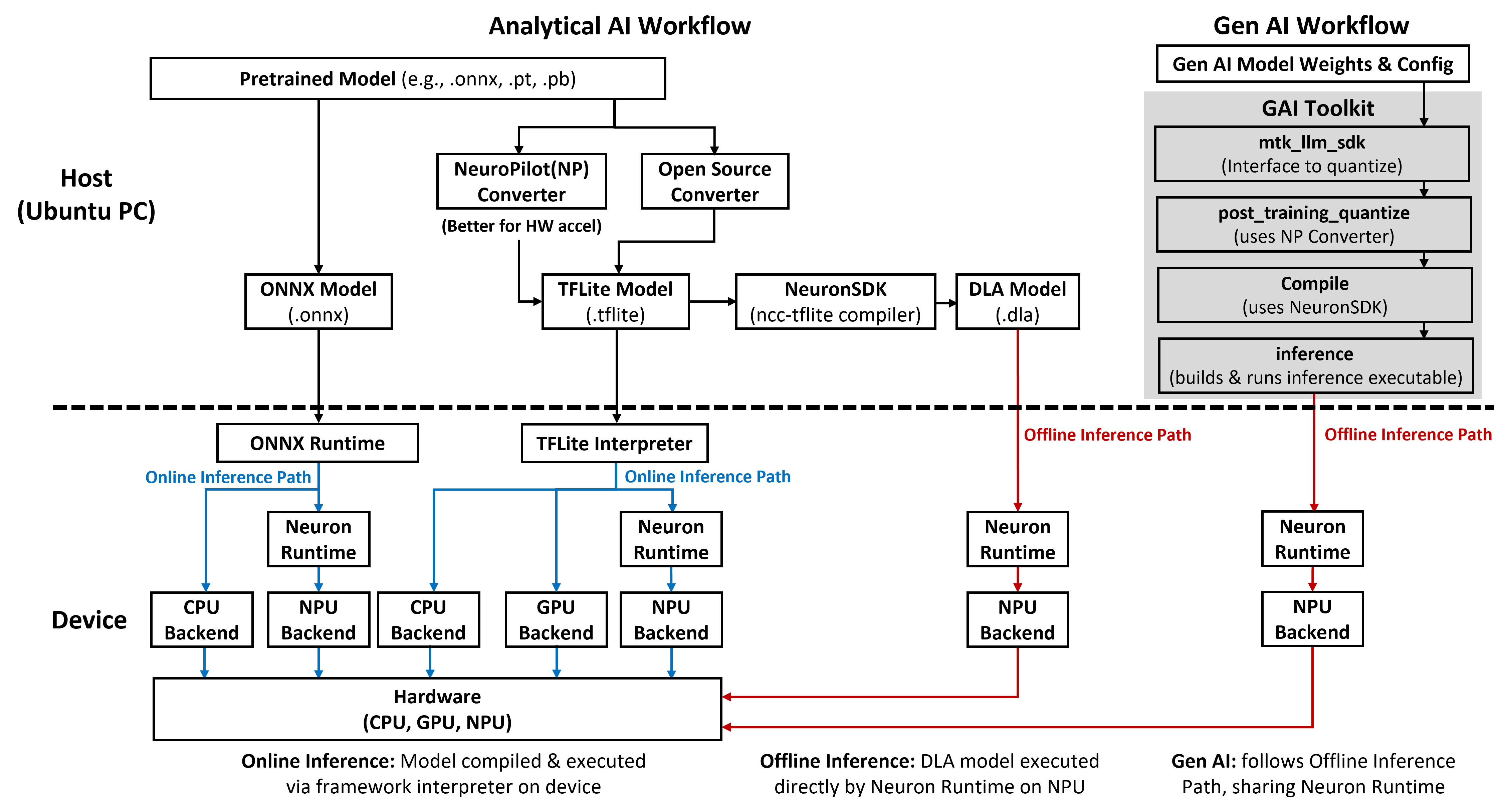
To deploy AI effectively on Genio platforms, developers must understand the underlying software-hardware relationship and the available inference paths.
Software-Hardware Binding
On Genio platforms, the NeuroPilot software version is tightly coupled to the hardware generation of the System-on-Chip (SoC). Each platform has a fixed NPU operator set and requires version-matched tools for conversion and compilation. Refer to Understanding the Software-Hardware Binding for detailed versioning information.
Inference Paths
The Genio AI software stack supports two primary execution modes:
Online Inference: Utilizes AI frameworks such as LiteRT (TFLite) Interpreter or ONNX Runtime on the device to compile and execute models.
Offline Inference: Executes pre-compiled Deep Learning Archive (DLA) models directly through the Neuron Runtime, offering minimal overhead and predictable latency.
For a detailed comparison of these paths, see Software Architecture.
AI Workload Categories
MediaTek Genio platforms support a wide range of AI models, categorized into Analytical AI and Generative AI (GAI).
Analytical AI
Analytical AI focuses on traditional vision and recognition tasks. Developers can choose between the TFLite path and the ONNX Runtime path:
TFLite Path: Optimized for vision tasks such as classification, detection, and recognition. See TFLite - Analytical AI.
ONNX Runtime Path: Offers a cross-platform engine for running models from various frameworks. See ONNX Runtime Overview.
Generative AI (GAI)
Genio supports large-scale generative models, including Large Language Models (LLMs), Vision-Language Models (VLMs), and Stable Diffusion. These workloads typically follow the offline inference path for maximum efficiency. See LiteRT - Generative AI.
Operating System Support
The AI software stack behavior and update policies vary across different operating systems.
OS |
TFLite (LiteRT) Variant |
Features |
|---|---|---|
Android |
Proprietary MediaTek-optimized |
Tightly coupled to Android releases with fixed CPU fallback behavior. |
Yocto |
Open-source LiteRT and ONNX Runtime |
Flexible customization and regular upgrades for improved compatibility. |
Ubuntu |
Standard open-source packages |
Suitable for desktop-like development and server-class evaluation. |
For more details on OS-specific setup, refer to Operating System Overview.
Development Workflow
The path from a pretrained model to on-device execution involves several key stages:
Model Conversion: Transform source models into TFLite or ONNX format using the Model Converter.
Model Visualization: Inspect tensor shapes and data types using Visualization Tools.
Compilation: Use the Neuron SDK to generate hardware-specific DLA files for offline inference.
Profiling: Analyze NPU utilization and performance metrics with Neuron Studio.
Evaluation: Verify model integrity through Accuracy Evaluation.
To start your first project, follow the Get Started With AI Tools guide.
Resources and Support
Model Hub: Access a curated collection of pre-trained models and benchmark data in the Model Zoo.
Developer Resources: Obtain SDK bundles, documentation, and tools by platform in AI Development Resources.
Troubleshooting: Resolve common deployment failures and operator support issues in Handling Unsupported OP and Models.