TFLite(LiteRT) - Analytical AI
The resources in this section support both the Online and Offline inference paths for TFLite-analytical AI workloads. This section provides the necessary TFLite models and pre-compiled Deep Learning Archives (DLAs) required to execute models via the TFLite Interpreter or directly through the Neuron Runtime.
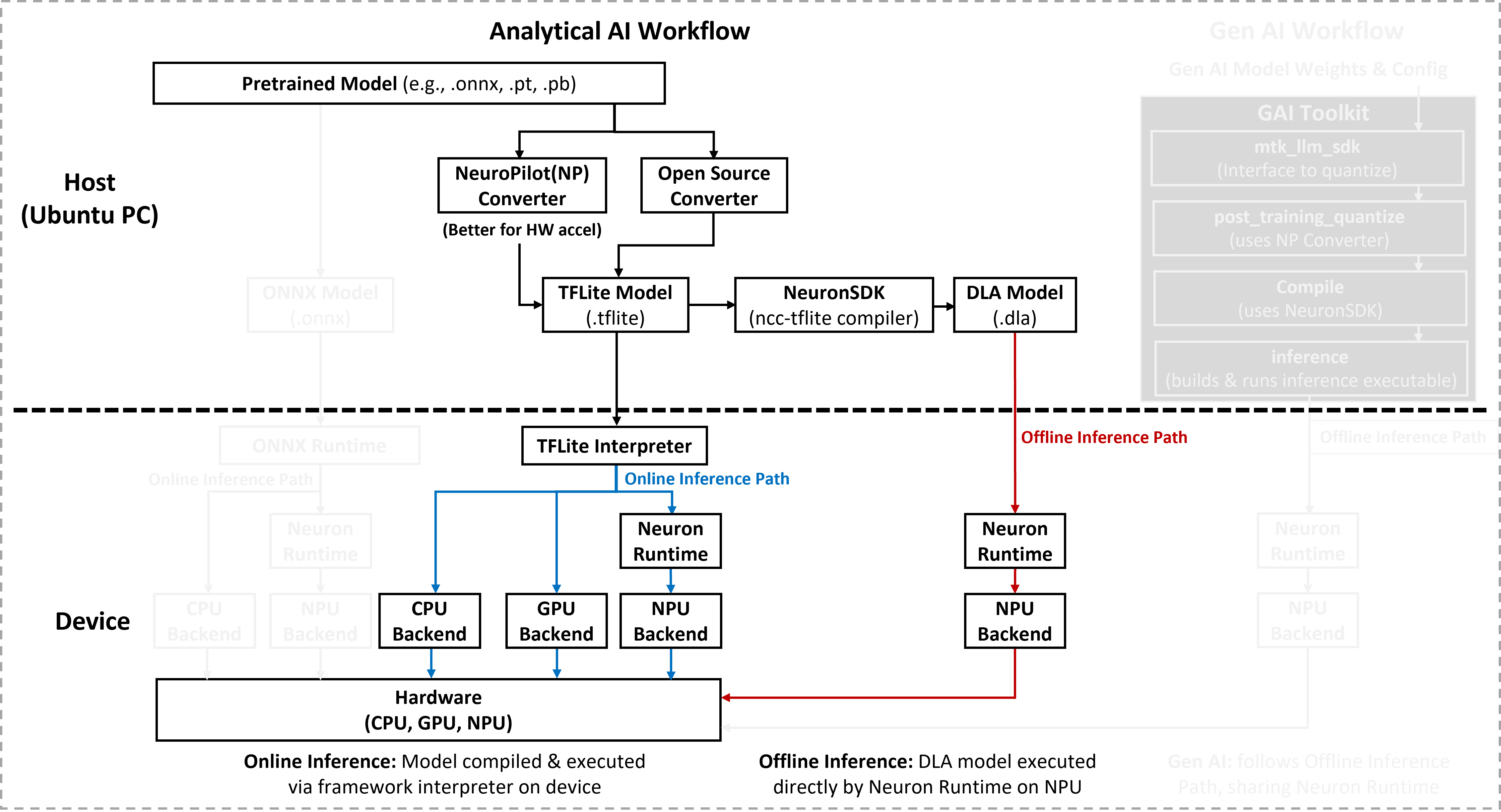
Note
To prepare your own models for these paths (such as quantization or compilation), refer to AI Development Resources to obtain the required NeuroPilot SDKs and host tools.
Vision models in the TFLite Analytical Model collection perform three core tasks on image data: image classification, object detection, and recognition. Together, these tasks help identify what appears in an image, where it is, and who or what a specific entity is. The Analytical Model section provides a curated set of commonly used TensorFlow Lite models and their converted Deep Learning Archives (DLAs) for deployment on MediaTek Genio platforms.
Each model package includes the following artifacts:
A baseline TensorFlow Lite (
.tflite) model.One or more version-specific DLA binaries:
mdla2for MDLA 2.x,mdla3for MDLA 3.x, andmdla5for MDLA 5.x.
You must run each DLA variant only on platforms that support the corresponding MDLA version.
MDLA Version Mapping
Use the following table to look up the MDLA version and the hardware accelerator supported by each Genio platform and select the matching DLA model:
Platform |
OS |
MDLA Version |
TFLite - Analytical AI (Online) |
TFLite - Analytical AI (Offline) |
Genio 360/360P |
Android |
5.3 |
CPU + GPU + NPU |
NPU |
Yocto |
5.3 |
CPU + GPU + NPU |
NPU |
|
Genio 420/520/720 |
Android |
5.3 |
CPU + GPU + NPU |
NPU |
Yocto |
5.3 |
CPU + GPU + NPU |
NPU |
|
Genio 510/700 |
Android |
3 |
CPU + GPU + NPU |
NPU |
Yocto |
3 |
CPU + GPU + NPU |
NPU |
|
Ubuntu |
3 |
CPU + GPU + NPU |
NPU |
|
Genio 1200 |
Android |
2 |
CPU + GPU + NPU |
NPU |
Yocto |
2 |
CPU + GPU + NPU |
NPU |
|
Ubuntu |
2 |
CPU + GPU + NPU |
NPU |
|
Genio 350 |
Android |
X |
CPU + GPU + NPU |
X |
Yocto |
X |
CPU + GPU |
X |
|
Ubuntu |
X |
CPU + GPU |
X |
Vision Tasks and Model Categories
The TFLite Analytical Model collection focuses on three primary visual AI tasks: image classification, object detection, and recognition. Each model family page documents the conversion workflow and benchmark performance for representative models on MediaTek Genio platforms.
Image Classification
Image classification is a fundamental computer vision task that predicts the category or class of an input image. Unlike object detection, classification models do not provide object locations. They output only the most likely label for the entire image.
For TFLite Analytical image classification models, the most common backbones are the following families on Genio platforms:
Object Detection
Object detection is a key task in computer vision that identifies and localizes objects within an image. Unlike classification, it outputs both the class and the bounding box of each detected object.
For TFLite Analytical object detection models, the most common backbones are the following families on Genio platforms:
Recognition
Recognition models identify or verify specific entities from input data, such as faces, persons, gestures, or text. Unlike classification, which predicts a general category, recognition focuses on determining who or what a target object is. These models often compare the target against a known database of identities or reference templates.
For TFLite Analytical recognition models, the most common backbones are the following families on Genio platforms:
Community Contributed Models
In addition to the primary task categories, the collection includes Community Contributed Models that are provided by the community. These models are shared without the original source training models, and model provenance or training recipes might not be available.
The available analytical and community contributed models for each task and Genio platform are listed in the tables below.
Supported Models on Genio Products
The following tables list the supported analytical models per Genio platform for each task category.
Note
The performance statistics shown in these tables were measured using offline inference with performance mode enabled across different Genio products, models, and data types.
Genio 360 |
Genio 420 |
Genio 520 |
Genio 720 |
Genio 510 |
Genio 700 |
Genio 1200 |
MT8893 |
||||||
Task |
Model Name |
Source model type |
Data Type |
Input Size |
Inference Time (ms) |
Inference Time (ms) |
Inference Time (ms) |
Inference Time (ms) |
Inference Time (ms) |
Inference Time (ms) |
Inference Time (ms) |
Inference Time (ms) |
Detail |
Object Detection |
YOLOv5s |
.pt |
Quant8 |
640x640 |
8.68 |
5.98 |
6.02 |
5.35 |
16 |
10.1 |
19 |
3.42 |
|
Object Detection |
YOLOv5s |
.pt |
Float32 |
640x640 |
28.25 |
20.15 |
18.49 |
16.66 |
44.9 |
32.3 |
37 |
11.4 |
|
Object Detection |
YOLOv8s |
.pt |
Quant8 |
640x640 |
12.92 |
9.40 |
9.02 |
8.04 |
24 |
17 |
28.4 |
5.64 |
|
Object Detection |
YOLOv8s |
.pt |
Float32 |
640x640 |
42.41 |
30.77 |
26.83 |
24.41 |
69.3 |
50.3 |
54.6 |
16.34 |
Genio 360 |
Genio 420 |
Genio 520 |
Genio 720 |
Genio 510 |
Genio 700 |
Genio 1200 |
MT8893 |
||||||
Task |
Model Name |
Source model type |
Data Type |
Input Size |
Inference Time (ms) |
Inference Time (ms) |
Inference Time (ms) |
Inference Time (ms) |
Inference Time (ms) |
Inference Time (ms) |
Inference Time (ms) |
Inference Time (ms) |
Detail |
Classification |
DenseNet |
.pt |
Quant8 |
224x224 |
5.86 |
4.27 |
4.17 |
3.83 |
7.3 |
5.3 |
6 |
2.4 |
|
Classification |
DenseNet |
.pt |
Float32 |
224x224 |
12.07 |
8.76 |
8.84 |
7.72 |
16.3 |
11.3 |
12.4 |
4.74 |
|
Classification |
EfficientNet |
.pt |
Quant8 |
224x224 |
2.2 |
1.46 |
1.59 |
1.56 |
4 |
3 |
3 |
1.16 |
|
Classification |
EfficientNet |
.pt |
Float32 |
224x224 |
4.85 |
3.39 |
3.30 |
3.15 |
9.3 |
6 |
6.1 |
2.21 |
|
Classification |
MobileNetV2 |
.pt |
Quant8 |
224x224 |
1.28 |
0.80 |
0.90 |
0.97 |
1 |
1 |
1 |
0.78 |
|
Classification |
MobileNetV2 |
.pt |
Float32 |
224x224 |
2.6 |
1.64 |
1.78 |
1.71 |
3 |
2 |
2.1 |
1.29 |
|
Classification |
MobileNetV3 |
.pt |
Quant8 |
224x224 |
0.91 |
0.64 |
0.59 |
0.74 |
1 |
0.4 |
0.9 |
0.64 |
|
Classification |
MobileNetV3 |
.pt |
Float32 |
224x224 |
1.67 |
1.09 |
1.13 |
1.2 |
2 |
1.1 |
2 |
0.97 |
|
Classification |
ResNet |
.pt |
Quant8 |
224x224 |
2.25 |
1.52 |
1.46 |
1.48 |
2 |
2 |
2.1 |
1.08 |
|
Classification |
ResNet |
.pt |
Float32 |
224x224 |
6.2 |
4.51 |
4.04 |
3.86 |
9.3 |
6.3 |
8.4 |
2.56 |
|
Classification |
SqueezeNet |
.pt |
Quant8 |
224x224 |
1.55 |
1.11 |
0.99 |
1.11 |
1 |
1 |
1 |
0.86 |
|
Classification |
SqueezeNet |
.pt |
Float32 |
224x224 |
3.57 |
2.54 |
2.26 |
2.31 |
4.1 |
3 |
3 |
1.64 |
|
Classification |
VGG |
.pt |
Quant8 |
224x224 |
17.72 |
12.78 |
13.32 |
11.17 |
N/A |
N/A |
24.4 |
6.47 |
|
Classification |
VGG |
.pt |
Float32 |
224x224 |
69.25 |
40.39 |
38.24 |
33.17 |
80.3 |
56.3 |
50.4 |
19.87 |
Genio 360 |
Genio 420 |
Genio 520 |
Genio 720 |
Genio 510 |
Genio 700 |
Genio 1200 |
MT8893 |
||||||
Task |
Model Name |
Source model type |
Data Type |
Input Size |
Inference Time (ms) |
Inference Time (ms) |
Inference Time (ms) |
Inference Time (ms) |
Inference Time (ms) |
Inference Time (ms) |
Inference Time (ms) |
Inference Time (ms) |
Detail |
Recognition |
VGGFace |
.pt |
Quant8 |
224x224 |
18.21 |
13.07 |
13.71 |
11.5 |
N/A |
N/A |
24.4 |
6.58 |
|
Recognition |
VGGFace |
.pt |
Float32 |
224x224 |
71.01 |
40.98 |
39.13 |
33.8 |
81.3 |
56.3 |
49.5 |
20 |
Performance Notes and Limitations
Note
The measurements were obtained using Neuron SDK(neuronrt), and each model’s detail page (linked from the tables) provides additional information about the test setup and configuration.
Performance can vary depending on:
The specific Genio platform and hardware configuration.
The version of the board image and evaluation kit (EVK).
The selected backend and model variant.
To obtain the most accurate performance numbers for your use case, you must run the application directly on the target platform.
Important
For online inference on Yocto, some models may not run on certain backends due to custom operators generated by the MediaTek converter.
These custom operators (for example, MTK_EXT ops) are not recognized or supported by the standard TensorFlow Lite interpreter, which can lead to incompatibility issues during inference.
In such cases, the corresponding entries in the tables are marked as N/A to indicate unavailable data.
The exact cause of a failure or unsupported configuration may vary per model. For more details, refer to the model‑specific documentation.