Genio 520/720-EVK
This chapter describes platform-dependent information and instructions. For example, you will get different benchmark results on different platforms.
For general usage of Wi-Fi, such as command to configure DHCP (Dynamic Host Configuration Protocol) or static IP and so on, please refer to Wi-Fi chapter.
Important
All the bash commands shown here use Genio 720-EVK. For Genio 520-EVK, users can follow the same step to do the whole setup and experiment with changing the naming term from 720 to 520.
Wireless Interface on Genio 520/720-EVK
The wireless (Wi-Fi and Bluetooth combo) card should be connect to PCIe interface (M.2 slot) on Genio 520/720-EVK:
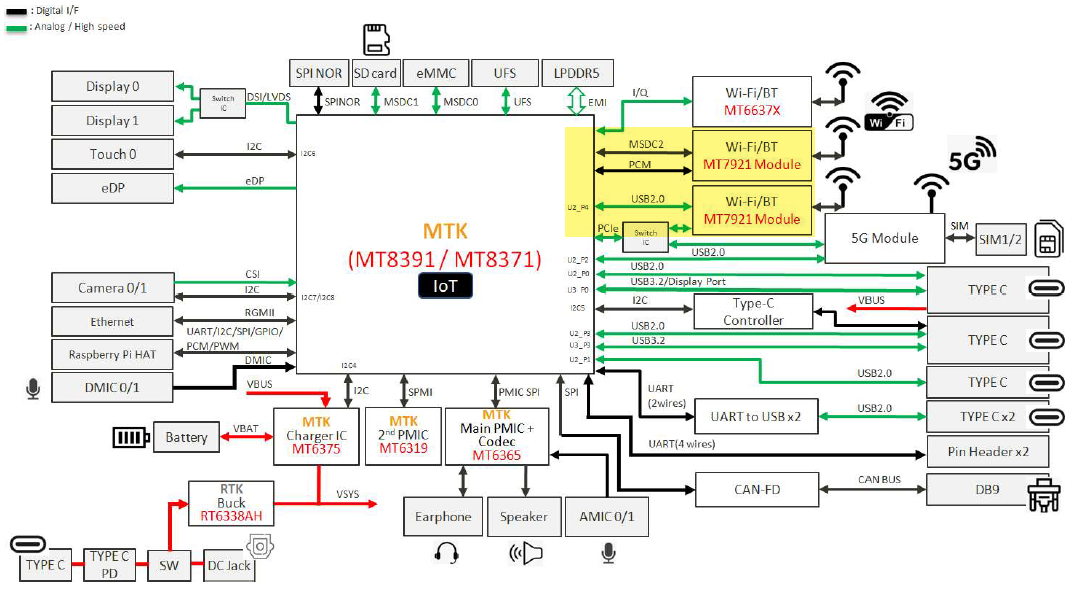
Wireless Interface on Genio 520/720-EVK
Install Wireless Card on Genio 520/720-EVK
The AzureWave MT7921L PCIe (Peripheral Component Interconnect Express) M.2 card supports WiFi6. We install this card on the right side on the Genio 520/720-EVK in pictures below.
Important
IoT Yocto - Genio 520/720-EVK supports MT7921L module by default. This installation guide uses the AW-XB468NF module. You can find more configuration details in MT7921 Module.
The Sona MT320 MT7921 Secure Digital Input Output (SDIO) M.2 card (with standard pin assignment, not included in the EVK package) supports WiFi6. Users should install this card on the left side on the Genio 520/720-EVK in pictures below.
Important
For Sona MT320 MT7921 SDIO M.2 card on Genio 520/720-EVK:
This card is not included in the EVK package and users must purchase it separately.
The pin assignment of this card are different from the previous MT7663 SDIO module AW-CB451NF and MT7921S SDIO module AW-XB554NF. Therefore, they are not interchangeable. Please be especially careful not to insert the wrong card.
This M.2 slot supports Sona MT320 MT7921 SDIO card (with standard pin assignment) after IoT Yocto V25.1. Users could verify some simple functions with Sona MT320 MT7921 SDIO M.2 card. However, for mass production, users should make their own boards to support full features for Sona MT320 MT7921 SDIO M.2 card. For further assistance, please contact MediaTek’s Customer Project Manager (CPM).
There is a M.2 PCIe slot on Genio 520/720-EVK. It is reserved for wireless card. In the picture below, you can find 2 cables connect to the antennas on MT7921 card. These cables use I-PEX MHF4 (I-PEX Micro Coaxial Connector, Half-pitch, Fourth Generation) connectors.
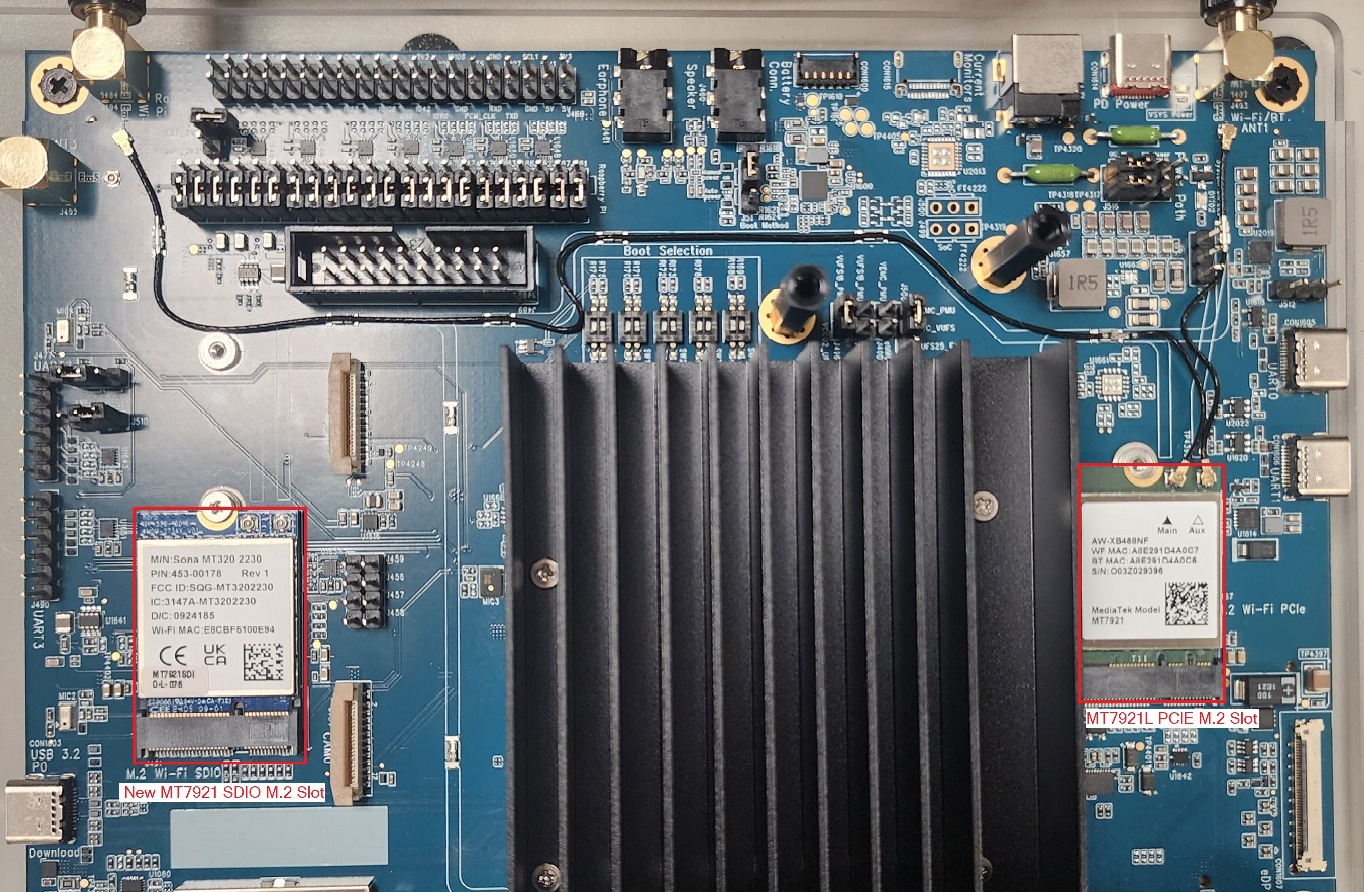
The Genio 520/720-EVK has an AzureWave MT7921L M.2 PCIe card and a Sona MT320 MT7921 SDIO M.2 card installed.
If you don’t have I-PEX (Integrated Peripheral EXpress) MHF4 cable and antennas, please buy a set and attach them to MT7921. Even a pair of 2db antennas will improve signal quality a lot.
Note
A MT6637X Wi-Fi (Wireless Fidelity)/BT Combo chip is on board. Android OS only uses this, and IoT Yocto does not support this chip. Please also double check the I-PEX MHF4 cable is not connected to the MT6637X if you’re using IoT Yocto OS.
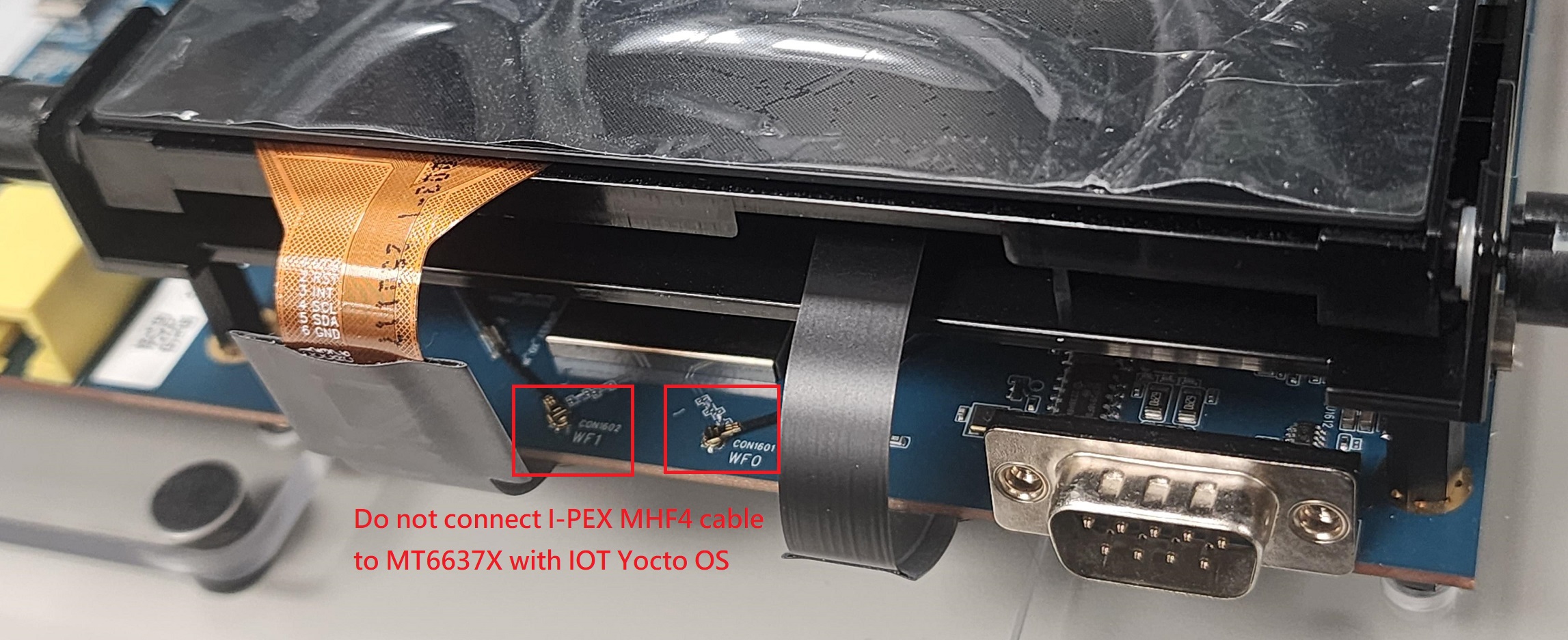
Do not use MT6637X with IoT Yocto OS
Note
Interface name in Linux OS may be different by modules:
For AzureWave MT7921L PCIe module, it should be wlp1s0. For Sona MT320 MT7921 SDIO M.2 card it should be wlan0.