Accuracy Evaluation
Important
This evaluation flow is not general to all neural network architectures. Developers must design evaluation tools and workflows tailored to the unique characteristics and requirements of their specific models.
This section provides validation metrics for the original PyTorch model, TFLite models (Quant8 and FP32), and compiled DLA models. Evaluation includes:
Models converted with open-source tools.
Models converted using the NeuroPilot Converter tool.
Hardware-level accuracy on the Genio-700 platform.
Note
It is recommended to use Python 3.7 for optimal compatibility with the required libraries and frameworks.
The following examples use the yolov5s_int8 model, which is available on the Model ZOO-YOLOv5s.
Accuracy Comparison
The following table summarizes the accuracy results for YOLOv5s.
Model Validation Type |
Pytorch Model (PC) |
Int8 TFLite (Source, PC) |
FP32 TFLite (Source, PC) |
Int8 TFLite (MTK, PC) |
FP32 TFLite (MTK, PC) |
Int8 DLA (MTK, Device) |
FP32 DLA (MTK, Device) |
P (Precision) |
0.709 |
0.723 |
0.669 |
0.659 |
0.669 |
0.633 |
0.667 |
R (Recall) |
0.634 |
0.583 |
0.661 |
0.638 |
0.661 |
0.652 |
0.661 |
mAP@50 |
0.713 |
0.675 |
0.712 |
0.699 |
0.699 |
0.698 |
0.712 |
mAP@50-95 |
0.475 |
0.416 |
0.472 |
0.461 |
0.458 |
0.459 |
0.472 |
Note
Source: TFLite model from an open-source converter.
MTK: TFLite model from the NeuroPilot Converter Tool.
PC: Accuracy calculated on a host PC.
Device: Accuracy calculated on the Genio 700 platform.
End-to-End Conversion Flow and Accuracy Evaluation
The following figure provides a detailed view of the end-to-end conversion flow and accuracy evaluation process, highlighting the relationship between host-side preparation and device-side verification.
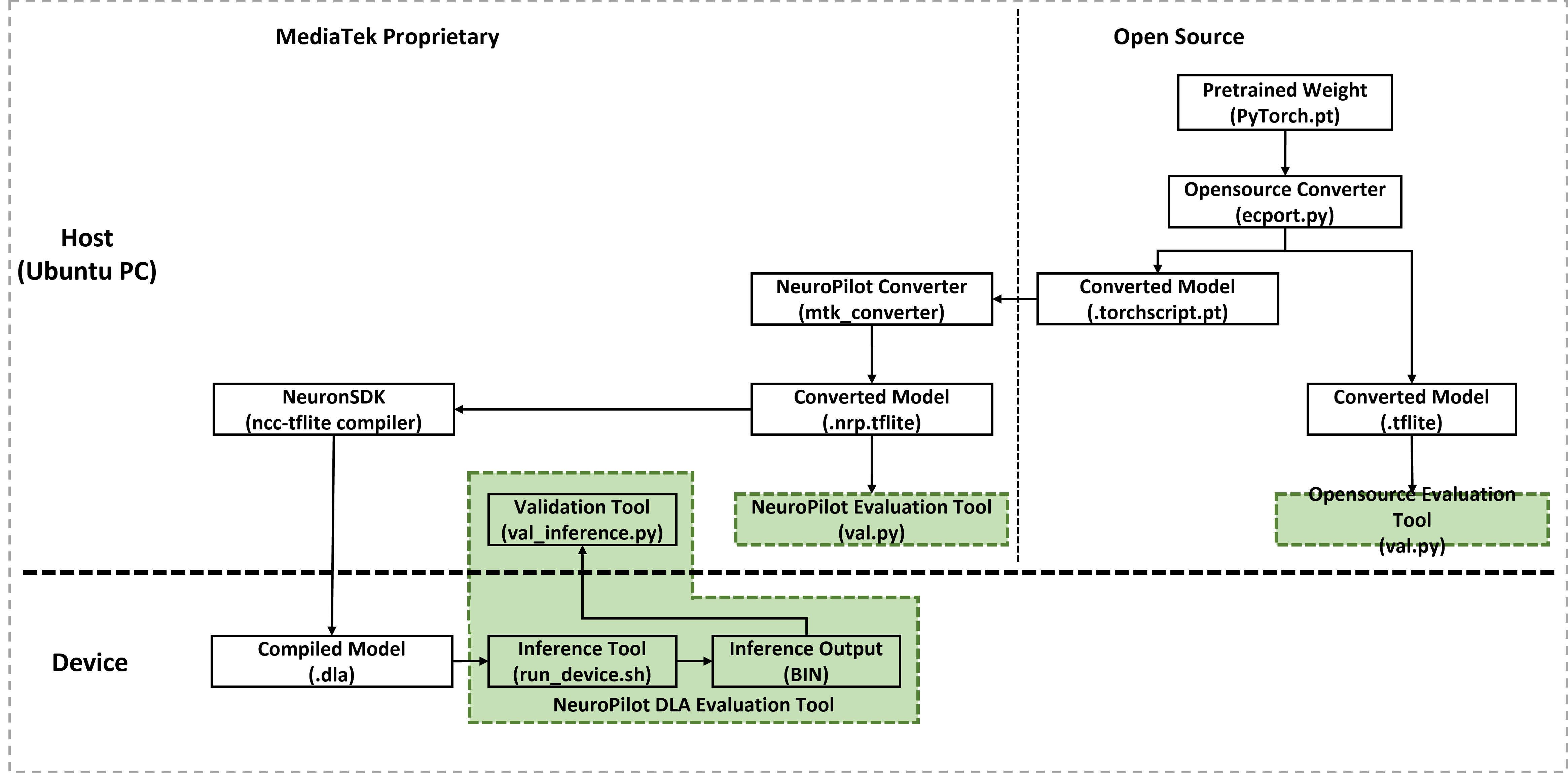
Detailed end-to-end conversion flow and accuracy evaluation
This section outlines the systematic steps required to verify YOLOv5s model accuracy throughout the end-to-end deployment workflow.
Source Model Evaluation
Evaluate the original model on a host PC to establish a performance baseline. Ensure all hardware requirements and software dependencies are met before execution.
PyTorch Model Evaluation
Obtain the PyTorch source model:
git clone http://github.com/ultralytics/yolov5
cd yolov5
git reset --hard 485da42
pip install -r requirements.txt
Run the evaluation script:
python val.py --weights yolov5s.pt --data coco128.yaml --img 640
--weights: Path to the PyTorch weights file.--data: Data configuration file.--img: Input image size.
Review the baseline results:
Metric
Value
P (Precision)
0.709
R (Recall)
0.634
mAP@50 (Mean Average Precision at IoU=0.50)
0.713
mAP@50-95 (mAP at IoU=0.50:0.95)
0.475
TFLite Model Evaluation
Evaluate the converted TFLite models on a host PC.
Evaluating Open-Source Models
INT8 Model
Export the model with INT8 quantization:
python export.py --weights yolov5s.pt --include tflite --int8
Validate the model:
python val.py --weights yolov5s-int8.tflite --data coco128.yaml --img 640
Result:
Metric
Value
P
0.723
R
0.583
mAP@50
0.675
mAP@50-95
0.416
FP32 Model
Download the required conversion scripts and patches:
wget https://mediatek-aiot.s3.ap-southeast-1.amazonaws.com/aiot/download/model-zoo/scripts/model_conversion_YOLOv5s_example_20240916.zip
unzip -j model_conversion_YOLOv5s_example_20240916.zip
Apply the export_fp32.patch and export the model:
git apply export_fp32.patch
python export.py --weights yolov5s.pt --include tflite
Validate the model:
python val.py --weights yolov5s-fp32.tflite --data coco128.yaml --img 640
Evaluating NeuroPilot Converter Models
INT8 Model
Ensure the NeuroPilot Converter Tool is installed before proceeding.
Export the model to TorchScript:
git apply Fix_yolov5_mtk_tflite_issue.patch
python export.py --weights yolov5s.pt --img-size 640 640 --include torchscript
Prepare calibration data and convert to INT8 TFLite:
python prepare_calibration_data.py
python convert_to_quant_tflite.py
Validate the MTK INT8 TFLite model:
python val.py --weights yolov5s_int8_mtk.tflite --data coco128.yaml --img 640
FP32 Model
Convert the model:
python export.py --weights yolov5s.pt --img-size 640 640 --include torchscript
python convert_to_tflite.py
Validate the MTK FP32 TFLite model:
python val.py --weights yolov5s_mtk.tflite --data coco128.yaml --img 640
DLA Model Evaluation
The developer performs this evaluation on a Genio 700 platform. Use NeuroPilot SDK version 6 to ensure full device compatibility.
Download and extract the NeuroPilot SDK All-In-One Bundle from the Official Portal.
Set the environment variables:
export LD_LIBRARY_PATH=/path/to/neuropilot-sdk-basic-<version>/neuron_sdk/host/lib
INT8 DLA Model
Compile the INT8 TFLite model to DLA format:
/path/to/ncc-tflite --arch=mdla3.0 yolov5s_int8_mtk.tflite
Push the required files to the device:
python prepare_evaluation_dataset.py
adb shell mkdir -p /tmp/yolov5/device_outputs
adb push yolov5s_int8_mtk.dla /tmp/yolov5
adb push evaluation_dataset /tmp/yolov5
adb push run_device.sh /tmp/yolov5
Execute inference on the device and pull results:
adb shell "cd /tmp/yolov5 && sh run_device.sh"
adb pull /tmp/yolov5/device_outputs .
python val_int8_inference.py --weights yolov5s_int8_mtk.tflite
FP32 DLA Model
Compile the FP32 model with the --relax-fp32 flag:
/path/to/ncc-tflite --arch=mdla3.0 --relax-fp32 yolov5s_mtk.tflite
Push files, execute on-device, and validate:
python prepare_evaluation_dataset_fp32.py
adb shell mkdir -p /tmp/yolov5/device_outputs_fp32
adb push yolov5s_mtk.dla /tmp/yolov5
adb push evaluation_dataset_fp32 /tmp/yolov5
adb push run_device_for_fp32.sh /tmp/yolov5
adb shell "cd /tmp/yolov5 && sh run_device_for_fp32.sh"
adb pull /tmp/yolov5/device_outputs_fp32 .
python val_fp32_inference.py --weights yolov5s_mtk.tflite
Troubleshooting
PyTorch Version Incompatibility
Error: RuntimeError: PyTorchConverter only supports 2.0.0 > torch >= 1.3.0.
Solution: Install a compatible PyTorch version:
pip3 install torch==1.9.0 torchvision==0.10.0