Software Architecture
The Genio AI software stack supports multiple inference paths for analytical AI and generative AI (GenAI) workloads. Both workload types share a common host–device architecture:
On the host (PC), tools prepare and compile models. These tools always run on the PC(Ubuntu_x86) and are independent of the online or offline inference mode.
On the device, the model either runs through an AI framework (online inference) or runs directly on Neuron Runtime (offline inference).
In this documentation, online and offline describe how the device executes the model:
Online inference – The device loads a deployable model (
.tfliteor.onnx) into an AI framework such as TFLite Interpreter or ONNX Runtime. The framework compiles the model on the device and delegates execution to hardware backends.Offline inference – The application loads a compiled
.dlamodel and sends it to Neuron Runtime for execution on the NPU. No AI framework runs on the device in this mode.
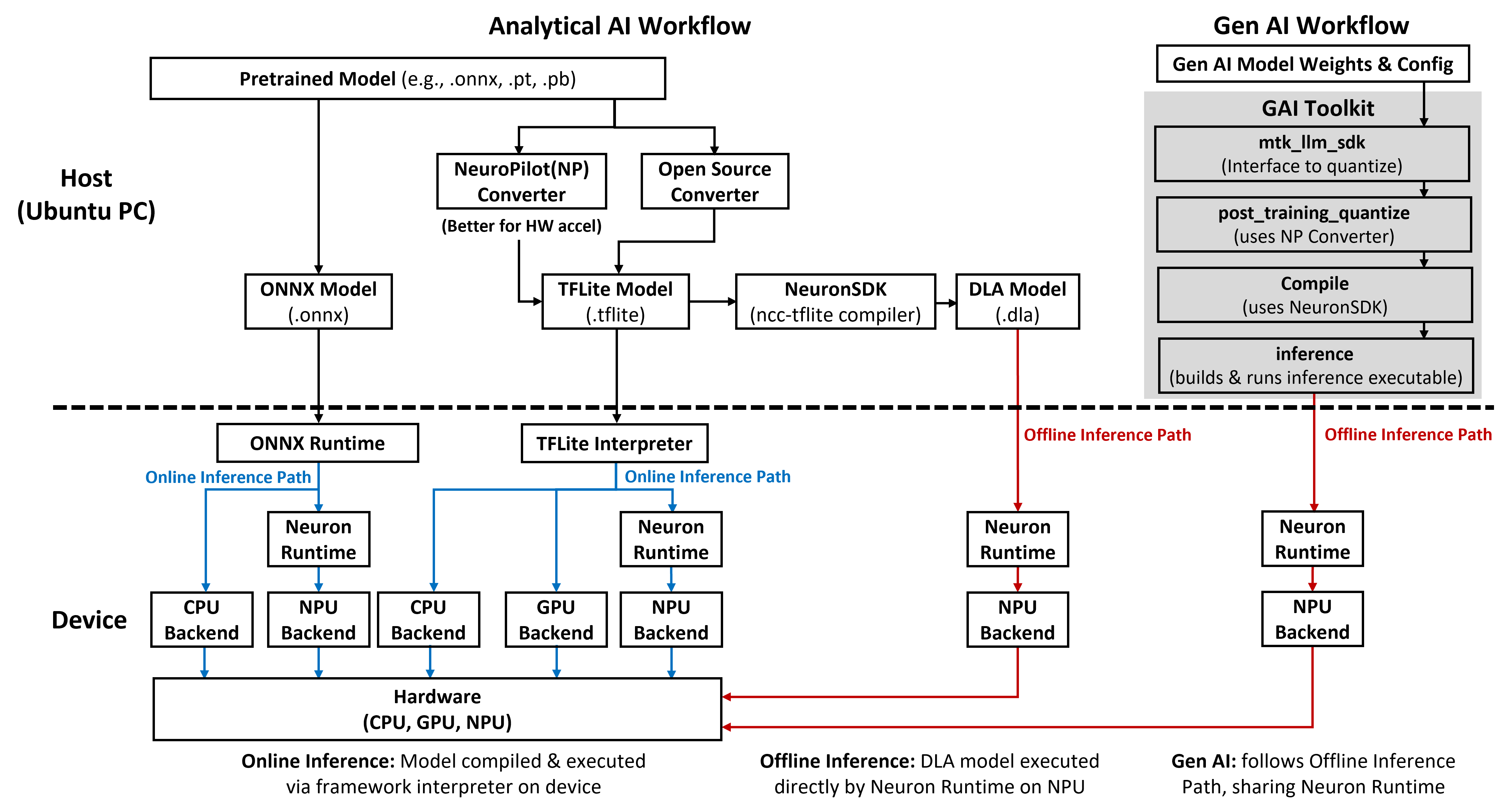
The following figure summarizes the host–device software stack and the main inference paths for analytical AI and GenAI.
Note
The figure illustrates analytical AI online and offline inference paths and the GenAI offline workflow. It uses Genio 520/720 with Android as a reference platform, which currently provides the most complete AI feature support. Actual availability of frameworks, accelerators, and operating system combinations may differ by platform. Please refer to Genio AI Supporting Scope for detailed support information. For operating system–specific integration steps, refer to the Android and Yocto integration guides.
Analytical AI – Online Inference Path
The analytical AI online path uses AI frameworks on the device and supports two framework flows: TFLite Interpreter and ONNX Runtime.
On the host (PC):
Developers start from pretrained models in formats such as
.onnx,.pt, or.pb.For the TFLite path:
Models are converted to
.tfliteby using either:NeuroPilot(NP) Converter for better hardware acceleration, or
an open‑source converter when NP‑specific acceleration is not required.
For the ONNX Runtime path:
Models are exported directly to ONNX format (
.onnx). No NP Converter is required for this path.
These host-side tools always run on the PC(Ubuntu_x86) and are not tied to online or offline execution.
The same .tflite model can later be used for either online or offline inference after compiled to .dla, depending on how it is deployed to the device.
On the device:
The application loads the deployable model into the selected framework:
TFLite Interpreter for
.tflitemodels.ONNX Runtime for
.onnxmodels.
The framework compiles the model on the device and dispatches workloads to the shared hardware backends:
TFLite supports CPU, GPU, and NPU backends.
ONNX Runtime supports CPU and NPU backends.
Both frameworks share the same underlying hardware (CPU, GPU, NPU). The choice of framework only affects how the model is compiled and delegated.
This online path is suitable when the application benefits from framework flexibility, mixed CPU/GPU/NPU execution, or easier debugging. The trade‑off is additional framework footprint on the device.
Analytical AI – Offline Inference Path
The analytical AI offline path removes the AI framework from the device and runs a compiled model directly on the NPU.
On the host (PC):
Developers first get a
.tflitemodel, typically by using:NP Converter for optimized hardware acceleration, or
an open‑source converter when NP‑specific optimization is not required.
Then use
ncc-tflite (a tool in **NP All-In-One Bundle**) compiles the ``.tflitemodel and generates a hardware‑specific compiled model in.dlaformat.
On the device:
The application loads the
.dlamodel directly into Neuron Runtime.Neuron Runtime executes the model on the NPU backend without requiring TFLite Interpreter or ONNX Runtime on the device.
Because only Neuron Runtime and the application participate in inference, the system achieves predictable latency and minimal software overhead.
This offline path is preferred for latency-critical products or deployments that must standardize on NPU-only execution without an additional AI framework.
GenAI – Offline Workflow
The GenAI offline workflow follows the same offline execution model as analytical AI and shares the same Neuron Runtime and NPU backend.
On the host (PC), the GAI Toolkit provides four main components that execute in sequence.
Note
The GAI Toolkit is intended for tutorial purposes; each generative model requires its own dedicated toolkit, as they are not interchangeable.
mtk_llm_sdk – Acts as the main interface to quantize generative AI models so that they can run on MediaTek MDLA hardware.
post_training_quantize – Performs post‑training quantization and converts the original model into a
.tflitemodel by using the same NP Converter as analytical AI.compile – Compiles each
.tflitefile into a compiled.dlamodel by using the same NeuronSDK toolchain.inference – Cross-compiles an offline inference executable and automatically pushes it to the device to perform the quantized
.dlamodel inference.
On the device:
The application, or the sample command‑line tool, loads the compiled
.dlamodel.Neuron Runtime executes GenAI inference on MDLA by using the same offline NPU execution path as analytical AI .