Neuron Compiler and Runtime (NeuronSDK)
This section introduces the tools inside Neuron SDK used to compile and verify AI models for Genio platforms. After converting a model to TFLite format (as described in Model Converter), the developer must compile it into a hardware-specific binary for optimized execution.
To start the compilation and deployment experiment immediately, see Compile TFLite Models to DLA.
Workflow Overview
The Neuron SDK provides a specialized toolchain for transforming and executing neural network models on the MediaTek Deep Learning Accelerator (MDLA) and Video Processing Unit (VPU).
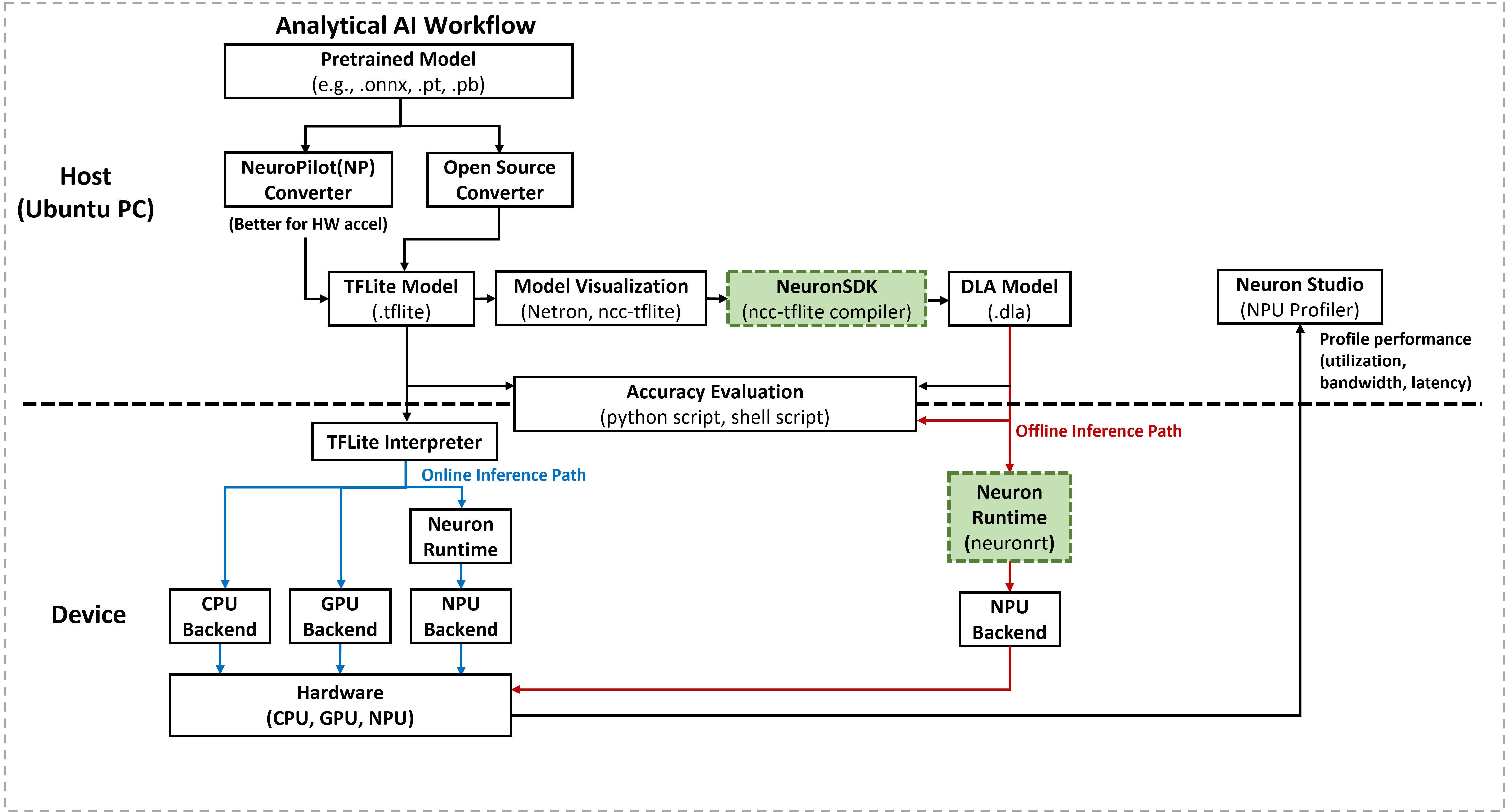
The SDK includes two primary command-line tools for the deployment workflow:
Neuron Compiler (
ncc-tflite): An offline tool that runs on a host PC to convert TFLite models into Deep Learning Archive (DLA) files.Neuron Runtime (
neuronrt): An on-device utility that loads DLA files and executes inference to verify model compatibility with the hardware’s offline inference path.
Note
The Neuron SDK workflow and capabilities on IoT Yocto align with the official NeuroPilot documentation. The instructions provided here apply specifically to Genio IoT platforms.
Neuron SDK Components
Neuron Compiler (ncc-tflite)
The Neuron Compiler serves as the bridge between generic framework models and MediaTek hardware. It performs the following tasks:
Validates TFLite model structures against hardware constraints.
Optimizes network graphs for specific MDLA and VPU architectures.
Generates a statically compiled
.dlabinary.
For a comprehensive list of optimization flags (such as --opt-bw or --relax-fp32), refer to the Neuron Compiler Section.
Neuron Runtime (neuronrt)
The Neuron Runtime is a lightweight execution engine designed for rapid validation. It enables the developer to:
Load compiled
.dlafiles directly on the Genio device.Confirm that the model executes successfully on the NPU backend.
Measure basic inference latency and resource utilization.
Important
The neuronrt tool is intended for verification and benchmarking of the offline inference path. For production applications, MediaTek recommends using the Neuron Runtime API to integrate model execution directly into C/C++ or Android applications.
Neuron Runtime API
A C/C++ API that:
Allows applications to load DLA files directly.
Provides control over input/output tensors, inference scheduling, and metadata (for example, via
NeuronRuntime_getMetadataInfoandNeuronRuntime_getMetadata).Enables integration of Neuron‑accelerated inference into existing applications without invoking the
neuronrtbinary.
Note
For host-side model development and conversion, it is recommended to NeuronSDK on a PC.
On-device compilation with ncc-tflite is supported only for specific use cases and may fail for large or complex models.
Experiment: Compile TFLite Models to DLA
This section demonstrates how to use the Neuron Compiler (ncc-tflite) to transform the YOLOv5s model into a deployable hardware binary.
Environment Setup
Download the NeuroPilot SDK: Obtain the SDK All-In-One Bundle (Version 6) from the Official Portal.
Extract the toolchain:
tar zxvf neuropilot-sdk-basic-<version>.tar.gz
Configure host libraries: The compiler requires specific shared libraries located within the bundle.
export LD_LIBRARY_PATH=/path/to/neuropilot-sdk-basic-<version>/neuron_sdk/host/lib
Model Compilation Examples
The developer performs compilation on the host PC using the converted YOLOv5s models.
For INT8 Quantized Models:
./ncc-tflite --arch=mdla3.0 yolov5s_int8_mtk.tflite -o yolov5s_int8.dla
For FP32 Models: The
--relax-fp32flag allows the compiler to use FP16 precision for NPU acceleration../ncc-tflite --arch=mdla3.0 --relax-fp32 yolov5s_mtk.tflite -o yolov5s_fp32.dla
Verify Execution with Neuron Runtime
After generating the .dla file, the developer must verify its execution on the target Genio platform. This step ensures the model is compatible with the offline inference path and can run successfully on the NPU.
Verify Model Compatibility
Transfer the model to the device:
adb push yolov5s_int8.dla /tmp/
Generate dummy input data: Use the
ddcommand to create a binary file matching the model’s input size (e.g., 640x640x3 for YOLOv5s).# Example for a specific input byte size adb shell "dd if=/dev/zero of=/tmp/input.bin bs=1 count=1228800"
Execute inference: Run the
neuronrtcommand to validate the DLA file on the hardware (-m hw). Use the-cflag to repeat the inference for performance profiling.adb shell "neuronrt -m hw -a /tmp/yolov5s_int8.dla -i /tmp/input.bin -c 10"
Example Output:
Inference repeats for 10 times.
Total inference time = 52.648 ms (5.2648 ms/inf)
Avg. FPS : 186.1
adb shell "neuronrt -m hw -a /tmp/yolov5s_int8.dla -i /tmp/input.bin"
Successful execution confirms that the model layers are correctly mapped to the NPU and the offline path is functional.
Supported Operations
This section summarizes how to determine which neural network operations and configurations are supported by Neuron SDK on a given platform.
Note
Operation support is constrained by multiple factors, including:
Operation type.
Operation parameters (for example, kernel size, stride, padding configuration).
Tensor dimensions for both inputs and outputs.
SoC platform and accelerator generation (for example, MDLA version).
Numeric format, including data type and quantization scheme.
Each compute device (MDLA, VPU, or CPU fallback) has its own guidelines and restrictions.
To check the supported operations and platform-specific constraints, please refer to the Hardware Specifications and Supported OPs documentation for the target reference board in the NeuroPilot Online Documentation.