Get Started With AI Tools
This section introduces the NeuroPilot development tools used to prepare, convert, and analyze AI models for Genio platforms. The examples use the YOLOv5s model to illustrate a typical end-to-end workflow from a source model to on-device execution.
Important
The documentation provides a reference example based on specific models and may not apply to all neural network architectures. Developers must design evaluation tools and workflows tailored to the unique characteristics and requirements of their specific models.
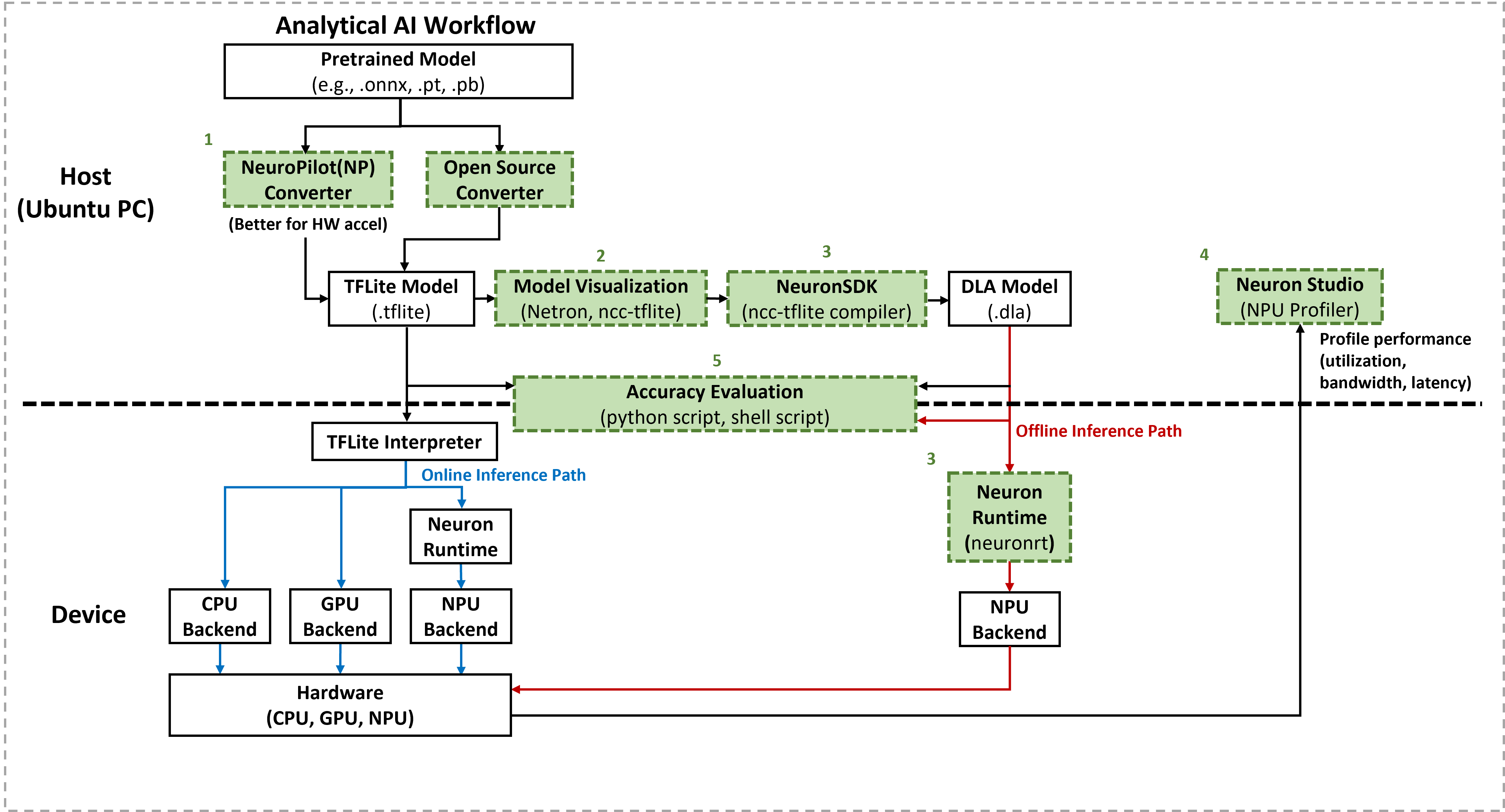
With these tools, developers can:
Convert to TFLite– Transform source models into
.tfliteformat using either the NP Converter (for optimized hardware acceleration) or open-source converters.Visualize models – Inspect the converted
.tflitemodels to verify tensor shapes, data types, and layer connections using tools like Netron orncc-tflite.Compile and deploy– Use the Neuron SDK (
ncc-tflite) to convert models into the MediaTek proprietary DLA format for offline execution and run them on-device withneuronrt.Profile performance – Use Neuron Studio to analyze NPU utilization, memory bandwidth, and execution latency with detailed metrics.
Evaluate accuracy – Compare the accuracy of the original model against the converted
.tfliteand compiled.dlamodels to ensure model integrity.
Please refer to each section for more detailed information.