RAW Sensor (V4L2 Sensor)
Important
All the bash commands shown here are based on Genio 720-EVK and a Sony IMX258 sensor. For Genio 520-EVK, users can follow the same steps to perform the setup by changing the name from 720 to 520. You might get different operation results depending on the platform you use.
This chapter shows how to receive RAW (bayer) sensor data and directly dump it to the DRAM under V4L2 Sensor architecture on Genio 520/720-EVK.
Camera Daughter Board
The RAW camera DTB for Genio 520/720-EVK is IoT-CAM-DTB-D8.
It contains a Sony IMX258 sensor.
The camera DTB connects with the Genio 520/720-EVK through a 22-pin FPC CAM-DTB-FPC-V2, which is compatible with the Raspberry Pi 22-pin camera cable.
Connect the Camera to the EVK
The EVK features two MIPI-CSI ports, allowing connection of up to two cameras. There is an FPC connecting the camera daughterboard to the EVK. Follow the figures below to complete the camera hardware settings.
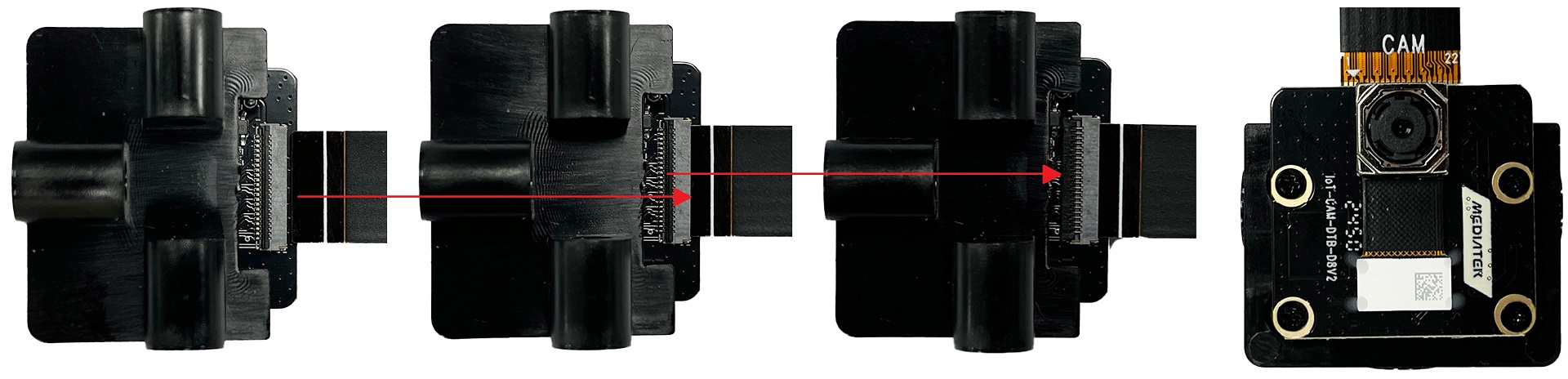
Camera Board FPC Installation
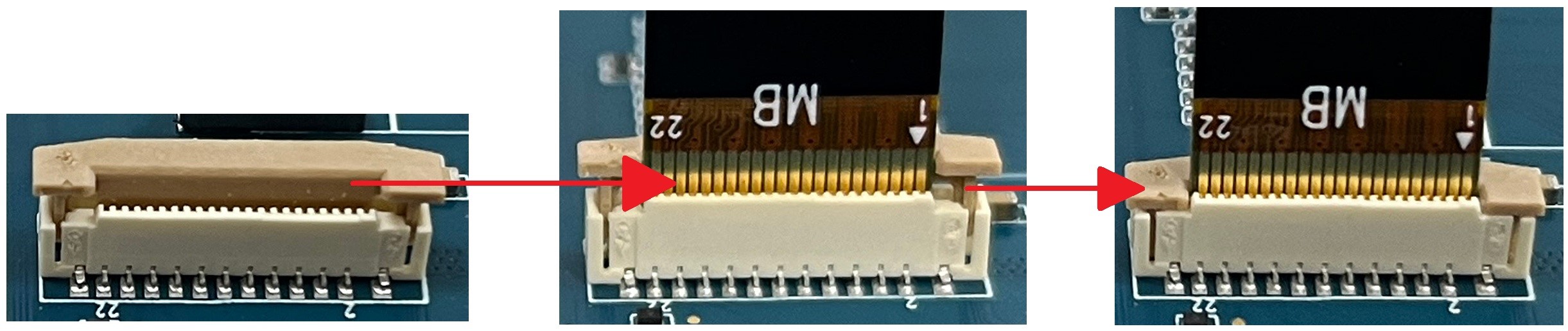
Genio 520/720-EVK FPC Installation
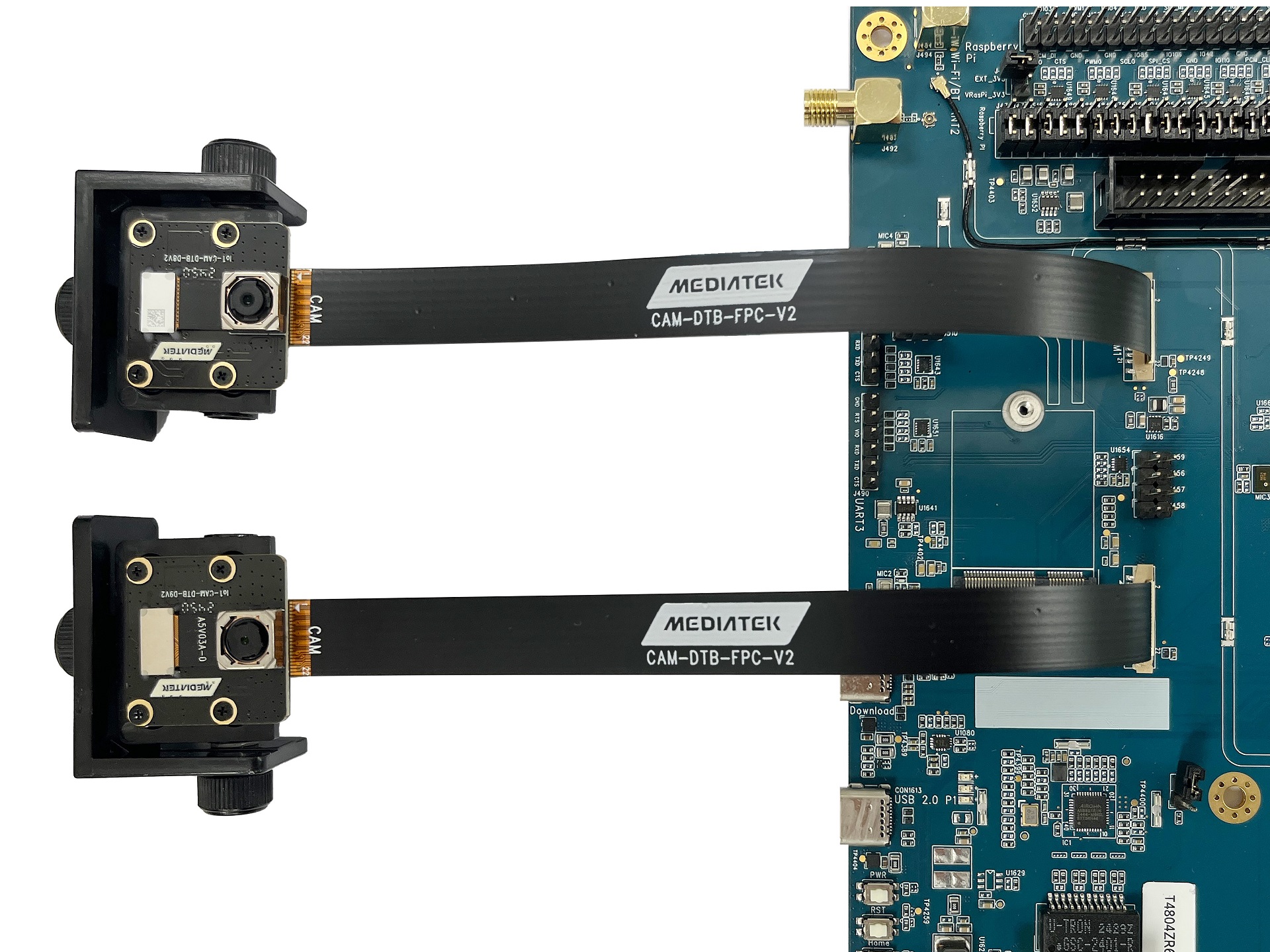
Genio 520/720-EVK and Camera Board Connection
Select Camera Device Tree Blob Overlay
The camera is inactive by default. The kernel must load a specific device tree blob overlay to enable the camera. Please refer to the bl33 (u-boot) section for more details.
Platform |
CSI0 |
CSI1 |
DTBO |
Usage |
|---|---|---|---|---|
Genio 520/720-EVK |
IMX258 |
x |
camera-imx258-csi0-std.dtbo |
Enable 4-lane CAM-DTB-D8 w/ Sony IMX258 on CAM0 using standard V4L2 driver |
Genio 520/720-EVK |
x |
IMX258 |
camera-imx258-csi1-std.dtbo |
Enable 4-lane CAM-DTB-D8 w/ Sony IMX258 on CAM1 using standard V4L2 driver |
Genio 520/720-EVK |
IMX258 |
IMX258 |
camera-imx258-dual-std.dtbo |
Enable 4-lane CAM-DTB-D8 w/ Sony IMX258 on CAM0 and CAM1 using standard V4L2 driver |
genio-flash --list-dtbo
List of available DTBO:
...
camera-imx258-csi0-std.dtbo
camera-imx258-csi1-std.dtbo
camera-imx258-dual-std.dtbo
...
genio-flash --load-dtbo camera-imx258-csi0-std.dtbo # Single RAW camera on CAM0
genio-flash --load-dtbo camera-imx258-csi1-std.dtbo # Single RAW camera on CAM1
genio-flash --load-dtbo camera-imx258-dual-std.dtbo # Dual RAW camera on CAM0 and CAM1
Warning
Please select the DTBO according to the CSI slot to which the camera sensor is connected.
For example, if the camera is connected to the CAM0 slot, please load the dtbo camera-imx258-csi0-std.dtbo.
Otherwise, the camera initialization will fail.
Supported Formats and Sizes
Platform |
Sensor |
Stream Type |
Size |
Frame rate |
Format |
MIPI Lanes |
|---|---|---|---|---|---|---|
Genio 520/720-EVK |
Sony IMX258 |
Preview |
2104x1560 |
30 |
BGGR10 |
4 |
Note
The supported format, resolution, and frame rate depend on the capabilities of the sensor and SoC.
Media Device
The media device represents the internal topology of a media system like ISP. Topology settings, including links, pads, and entities, can be configured through the media device. Therefore, the first step is to find the target media device node.
export MEDIA_DEV=$(v4l2-ctl -z platform:$(basename `find /sys/bus/platform/devices/ -name "*seninf-top"`) --list-devices | grep media)
echo ${MEDIA_DEV}
/dev/media1
Warning
The assigned node number for the media device may vary depending on the sequence of the probing process during the boot-up phase. As such, it is crucial to ensure the accuracy of the media device node before using the camera.
Video Device
The video device is the interface for users to obtain the images. On Genio 520/720-EVK, they are called 1a09[2-7]000\.camsv[2-7] video stream.
media-ctl is a useful tool to list video devices.
declare -a VIDEO_DEV=($(for i in `find /sys/bus/platform/devices/ -name "*camsv*" | sort`; do media-ctl -d ${MEDIA_DEV} --entity "`basename $i` video stream" ; done))
echo ${VIDEO_DEV[*]}
/dev/video5 /dev/video6 /dev/video7 /dev/video8 /dev/video9 /dev/video10
Warning
The assigned node number for the video device may vary depending on the sequence of the probing process during the boot-up phase. As such, it is crucial to ensure the accuracy of the video device node before using the camera.
Launch Camera
The initial step is to link all the necessary components within the media device. The structure of the RAW camera pipeline is quite straightforward. It consists of only three components: the sensor, SENINF, and CAMSV.
media-ctl -d ${MEDIA_DEV} -l "'imx258 7-001a':0 -> 'seninf-0':0 [1]"
media-ctl -d ${MEDIA_DEV} -l "'seninf-0':1 -> '1a092000.camsv2':0 [1]"
The second step is to assign the correct format and size to each component within the camera pipeline.
media-ctl -d ${MEDIA_DEV} -V "'imx258 7-001a':0 [fmt:SBGGR10_1X10/2104x1560]"
media-ctl -d ${MEDIA_DEV} -V "'seninf-0':1 [fmt:SBGGR10_1X10/2104x1560]"
media-ctl -d ${MEDIA_DEV} -V "'1a092000.camsv2':1 [fmt:SBGGR10_1X10/2104x1560]"
Lastly, to activate the camera, users can use v4l2-ctl, or other V4L2 applications.
The MediaTek packed SBGGR10 format is MBBA (V4L2_PIX_FMT_MTISP_SBGGR10).
v4l2-ctl -d ${VIDEO_DEV[0]} --set-fmt-video=width=2104,height=1560,pixelformat=MBBA --stream-mmap --stream-count=10 --verbose
VIDIOC_QUERYCAP: ok
VIDIOC_G_FMT: ok
VIDIOC_S_FMT: ok
Format Video Capture Multiplanar:
        Width/Height      : 2104/1560
        Pixel Format      : 'MBBA' (10-bit Bayer BGGR MTISP Packed)
        Field             : None
        Number of planes  : 1
        Flags             :
        Colorspace        : sRGB
        Transfer Function : Default
        YCbCr/HSV Encoding: Default
        Quantization      : Full Range
        Plane 0           :
           Bytes per Line : 2632
           Size Image     : 4105920
                VIDIOC_REQBUFS returned 0 (Success)
                VIDIOC_QUERYBUF returned 0 (Success)
                VIDIOC_QUERYBUF returned 0 (Success)
                VIDIOC_QUERYBUF returned 0 (Success)
                VIDIOC_QUERYBUF returned 0 (Success)
                VIDIOC_G_FMT returned 0 (Success)
                VIDIOC_QBUF returned 0 (Success)
                VIDIOC_QBUF returned 0 (Success)
                VIDIOC_QBUF returned 0 (Success)
                VIDIOC_QBUF returned 0 (Success)
                VIDIOC_STREAMON returned 0 (Success)
cap dqbuf: 0 seq:      0 bytesused: 4105920 ts: 1375.766087 field: None (ts-monotonic, ts-src-eof)
cap dqbuf: 1 seq:      1 bytesused: 4105920 ts: 1375.799641 delta: 33.554 ms field: None (ts-monotonic, ts-src-eof)
cap dqbuf: 2 seq:      2 bytesused: 4105920 ts: 1375.833224 delta: 33.583 ms field: None (ts-monotonic, ts-src-eof)
cap dqbuf: 3 seq:      3 bytesused: 4105920 ts: 1375.866744 delta: 33.520 ms field: None (ts-monotonic, ts-src-eof)
cap dqbuf: 0 seq:      4 bytesused: 4105920 ts: 1375.900304 delta: 33.560 ms fps: 29.80 field: None (ts-monotonic, ts-src-eof)
cap dqbuf: 1 seq:      5 bytesused: 4105920 ts: 1375.933886 delta: 33.582 ms fps: 29.80 field: None (ts-monotonic, ts-src-eof)
cap dqbuf: 2 seq:      6 bytesused: 4105920 ts: 1375.967347 delta: 33.461 ms fps: 29.81 field: None (ts-monotonic, ts-src-eof)
cap dqbuf: 3 seq:      7 bytesused: 4105920 ts: 1376.000966 delta: 33.619 ms fps: 29.80 field: None (ts-monotonic, ts-src-eof)
cap dqbuf: 0 seq:      8 bytesused: 4105920 ts: 1376.034541 delta: 33.575 ms fps: 29.80 field: None (ts-monotonic, ts-src-eof)
cap dqbuf: 1 seq:      9 bytesused: 4105920 ts: 1376.068075 delta: 33.534 ms fps: 29.80 field: None (ts-monotonic, ts-src-eof)