Demo App: NNStreamer
Overview
NNStreamer is an open-source collection of GStreamer plugins that simplifies the integration of neural networks into multimedia pipelines. Samsung initially developed the project before transferring it to the LF AI & Data Foundation.
NNStreamer allows developers to:
Integrate neural network models into GStreamer pipelines efficiently.
Manage neural network filters and data streams within a unified framework.
Incorporate custom C/C++ or Python objects and various AI frameworks at runtime.
For comprehensive details, refer to the NNStreamer Official Documentation.
IoT Yocto includes a specialized tensor_filter subplugin designed for the Neuron SDK. Developers use tensor_filter_neuronsdk to build pipelines that leverage Genio hardware accelerators, such as the MDLA. The source implementation is located in the IoT Yocto NNStreamer tree at ext/nnstreamer/tensor_filter/tensor_filter_neuronsdk.cc.
The following figure shows the software stack for NNStreamer on IoT Yocto.
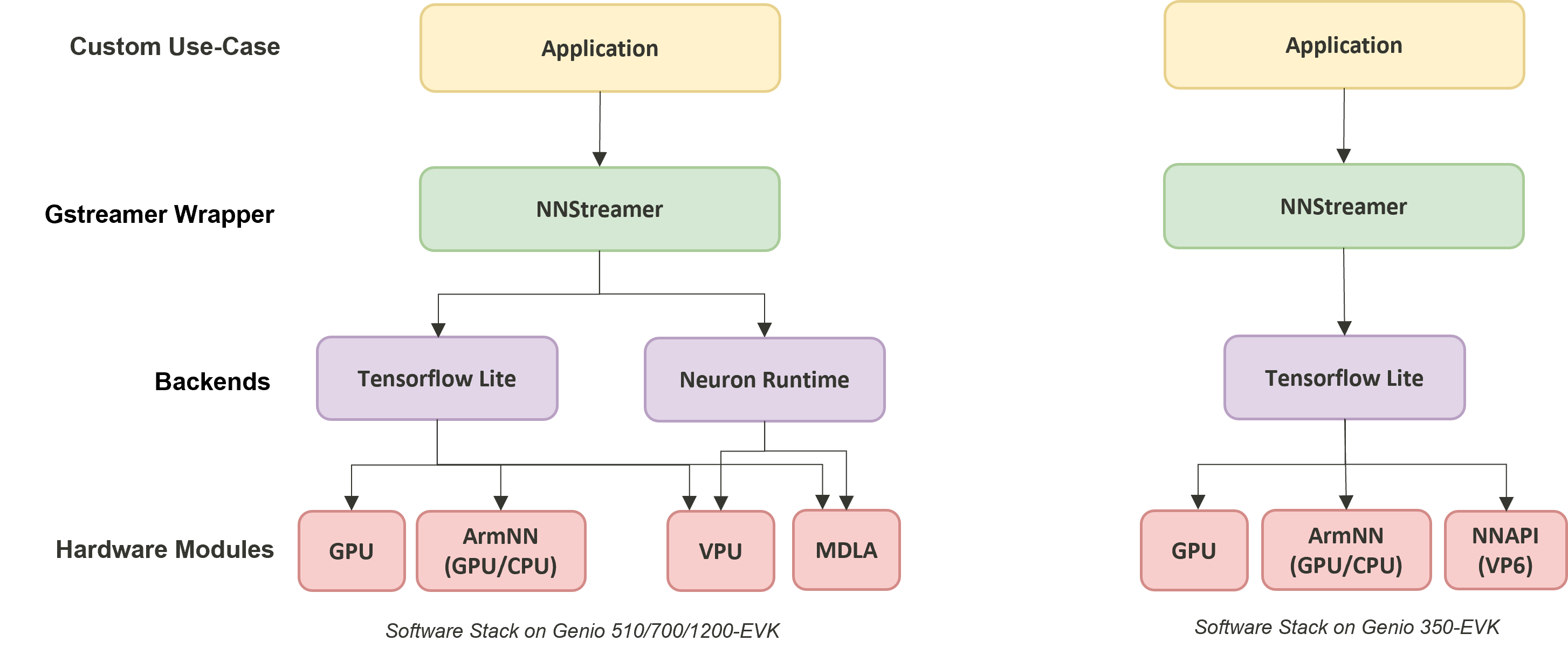
NNStreamer on IOT Yocto
The machine learning software stack on IoT Yocto provides multiple backend and accelerator options. Developers can run inference with the online Neuron Stable Delegate on MediaTek’s AI Processing Unit (NPU).
Software Stack |
Backend |
Genio 360 |
Genio 360P |
Genio 420 |
Genio 520 |
Genio 720 |
Genio 510 |
Genio 700 |
Genio 1200 |
Genio 350 |
Tensorflow-Lite CPU |
CPU |
V |
V |
V |
V |
V |
V |
V |
V |
V |
Tensorflow-Lite + GPU delegate |
GPU |
V |
V |
V |
V |
V |
V |
V |
V |
V |
Tensorflow-Lite + Neuron Stable Delegate |
MDLA |
V |
V |
V |
V |
V |
V |
V |
V |
X |
Neuron SDK |
MDLA |
V |
V |
V |
V |
V |
V |
V |
V |
X |
Onnxruntime + CPU Execution Provider |
CPU |
V |
V |
V |
V |
V |
V |
V |
V |
V |
Onnxruntime + NPU Execution Provider |
MDLA |
V |
V |
V |
V |
V |
X |
X |
X |
X |
NNStreamer::tensor_filter
The NNStreamer plugin tensor_filter plays a central role in NNStreamer. It acts as a bridge between GStreamer data streams and neural network frameworks, such as TensorFlow Lite. It converts GStreamer buffers to the format expected by neural networks and executes model inference.
Like a typical GStreamer plugin, the gst-inspect-1.0 command shows the details of the tensor_filter element:
gst-inspect-1.0 tensor_filter
...
Pad Templates:
SINK template: 'sink'
Availability: Always
Capabilities:
other/tensor
framerate: [ 0/1, 2147483647/1 ]
other/tensors
format: { (string)static, (string)flexible }
framerate: [ 0/1, 2147483647/1 ]
SRC template: 'src'
Availability: Always
Capabilities:
other/tensor
framerate: [ 0/1, 2147483647/1 ]
other/tensors
format: { (string)static, (string)flexible }
framerate: [ 0/1, 2147483647/1 ]
Element has no clocking capabilities.
Element has no URI handling capabilities.
Pads:
SINK: 'sink'
Pad Template: 'sink'
SRC: 'src'
Pad Template: 'src'
Element Properties:
accelerator : Set accelerator for the subplugin with format (true/false):(comma separated ACCELERATOR(s)). true/false determines if accelerator is to be used. list of accelerators determines the backend (ignored with false). Example, if GPU, NPU can be used but not CPU - true:npu,gpu,!cpu. The full list of accelerators can be found in nnstreamer_plugin_api_filter.h. Note that only a few subplugins support this property.
flags: readable, writable
String. Default: ""
custom : Custom properties for subplugins ?
flags: readable, writable
String. Default: ""
framework : Neural network framework
flags: readable, writable
String. Default: "auto"
input : Input tensor dimension from inner array, up to 4 dimensions ?
flags: readable, writable
String. Default: ""
input-combination : Select the input tensor(s) to invoke the models
flags: readable, writable
String. Default: ""
inputlayout : Set channel first (NCHW) or channel last layout (NHWC) or None for input data. Layout of the data can be any or NHWC or NCHW or none for now.
flags: readable, writable
String. Default: ""
inputname : The Name of Input Tensor
flags: readable, writable
String. Default: ""
inputranks : The Rank of the Input Tensor, which is separated with ',' in case of multiple Tensors
flags: readable
String. Default: ""
inputtype : Type of each element of the input tensor ?
...
TensorFlow Lite Framework
Developers can construct GStreamer pipelines by using the existing tensor_filter_tensorflow_lite subplugin. Examples using the TensorFlow Lite framework are available in NNStreamer-Example.
When tensor_filter_tensorflow_lite is used, properties such as the framework (neural network framework) and model (model path) must be set.
However, developers do not need to specify model metadata such as input/output type and input/output dimension, because tensor_filter_tensorflow_lite reads this information directly from the TFLite model file.
The following snippet shows a tensor_filter configured to use the TensorFlow Lite framework.
For full pipeline examples, refer to NNStreamer-Example.
... tensor_converter ! \
tensor_filter framework=tensorflow-lite model=/usr/bin/nnstreamer-demo/mobilenet_v1_1.0_224_quant.tflite custom=NumThreads:8 ! \
...
Neuron Framework
IoT Yocto provides a tensor_filter subplugin that supports Neuron SDK.
Developers can use tensor_filter_neuronsdk to create GStreamer pipelines that leverage the Genio platform AI accelerators.
The source implementation is located in the IoT Yocto NNStreamer repository:
$BUILD_DIR/tmp/work/armv8a-poky-linux/nnstreamer/$PV/git/ext/nnstreamer/tensor_filter/tensor_filter_neuronsdk.cc
In contrast to the TensorFlow Lite framework, all model-related properties, including the neural network framework, model path, input/output type, and input/output dimension, must be provided explicitly when using tensor_filter_neuronsdk.
For security reasons, the model information is embedded in the DLA file and is not exposed by the runtime.
Therefore, it is important that developers fully understand the input and output specifications of their models.
The following snippet shows a tensor_filter configured to use Neuron SDK:
...  tensor_converter ! \
tensor_filter framework=neuronsdk model=/usr/bin/nnstreamer-demo/mobilenet_v1_1.0_224_quant.dla inputtype=uint8 input=3:224:224:1 outputtype=uint8 output=1001:1 ! \
...
Note
The main tensor_filter properties related to tensor type and dimension are:
inputtype: Type of each element of the input tensor.
inputlayout: Channel-first (NCHW), channel-last (NHWC), or none for input data.
input: Input tensor dimension, up to 4 dimensions.
outputtype: Type of each element of the output tensor.
outputlayout: Channel-first (NCHW), channel-last (NHWC), or none for output data.
output: Output tensor dimension, up to 4 dimensions.
For more details, refer to the NNStreamer online documentation and the tensor_filter common source code.
NNStreamer Unit Test
NNStreamer provides a gtest-based test suite for the common library and NNStreamer plugins. Running these unit tests helps verify the integration status of NNStreamer on IoT Yocto.
cd /usr/bin/unittest-nnstreamer/
ssat
...
==================================================

[PASSED] transform_typecast (37 passed among 39 cases)
[PASSED] nnstreamer_filter_neuronsdk (8 passed among 8 cases)
[PASSED] transform_dimchg (13 passed among 13 cases)
[PASSED] nnstreamer_decoder_pose (3 passed among 3 cases)
[PASSED] nnstreamer_decoder_boundingbox (15 passed among 15 cases)
[PASSED] transform_clamp (10 passed among 10 cases)
[PASSED] transform_stand (9 passed among 9 cases)
[PASSED] transform_arithmetic (36 passed among 36 cases)
[PASSED] nnstreamer_decoder (17 passed among 17 cases)
[PASSED] nnstreamer_filter_custom (23 passed among 23 cases)
[PASSED] transform_transpose (16 passed among 16 cases)
[PASSED] nnstreamer_filter_tensorflow2_lite (31 passed among 31 cases)
[PASSED] nnstreamer_repo_rnn (2 passed among 2 cases)
[PASSED] nnstreamer_converter (32 passed among 32 cases)
[PASSED] nnstreamer_repo_dynamicity (10 passed among 10 cases)
[PASSED] nnstreamer_mux (84 passed among 84 cases)
[PASSED] nnstreamer_split (21 passed among 21 cases)
[PASSED] nnstreamer_repo (77 passed among 77 cases)
[PASSED] nnstreamer_demux (43 passed among 43 cases)
[PASSED] nnstreamer_filter_python3 (0 passed among 0 cases)
[PASSED] nnstreamer_rate (17 passed among 17 cases)
[PASSED] nnstreamer_repo_lstm (2 passed among 2 cases)
==================================================
[PASSED] All Test Groups (23) Passed!
        TC Passed: 595 / Failed: 0 / Ignored: 2
Some test cases are marked as “Ignored” because they do not implement the runTest.sh script in their test directory, which is required by ssat.
Even when ssat ignores a test group, the integration status can still be checked by running the individual unit test binary.
The following example shows how to run the Arm NN unit test (for reference):
cd /usr/bin/unittest-nnstreamer/tests/
export NNSTREAMER_SOURCE_ROOT_PATH=/usr/bin/unittest-nnstreamer/
./unittest_filter_armnn
...
[==========] 13 tests from 1 test suite ran. (141 ms total)
[  PASSED  ] 13 tests.
NNStreamer Pipeline Examples
IoT Yocto provides several Python examples in /usr/bin/nnstreamer-demo/ to demonstrate how to build NNStreamer pipelines with different tensor_filter configurations for various use cases.
These examples are adapted from NNStreamer-Example.
Category |
Input Source |
Python script |
Demo Runner |
run_nnstreamer_example.py |
|
Image Classification |
Camera |
nnstreamer_example_image_classification.py |
Object Detection |
Camera |
nnstreamer_example_object_detection.py |
Object Detection |
Camera |
nnstreamer_example_object_detection_yolov5.py |
Pose Estimation |
Camera |
nnstreamer_example_pose_estimation.py |
Face Detection |
Camera |
nnstreamer_example_face_detection.py |
Monocular Depth Estimation |
Camera |
nnstreamer_example_monocular_depth_estimation.py |
Image Enhancement |
Image |
nnstreamer_example_low_light_image_enhancement.py |
Each application can be run directly via its own Python script.
However, IoT Yocto strongly recommends launching them through the demo runner run_nnstreamer_example.py.
The demo runner allows developers to switch between applications and frameworks by changing command-line arguments instead of manually constructing GStreamer commands.
The remainder of this section uses run_nnstreamer_example.py to walk through the demo flow.
Use --help to list all available options:
python3 run_nnstreamer_example.py --help
usage: run_nnstreamer_example.py [-h] [--app {image_classification,object_detection,object_detection_yolov5,face_detection,pose_estimation,low_light_image_enhancement,monocular_depth_estimation}]
                             [--engine {neuronsdk,neuron_stable}] [--img IMG] [--cam CAM] --cam_type {uvc,yuvsensor,rawsensor} [--width WIDTH] [--height HEIGHT] [--performance {0,1}]
                             [--fullscreen {0,1}] [--throughput {0,1}] [--rot ROT]

options:
-h, --help            show this help message and exit
--app {image_classification,object_detection,object_detection_yolov5,face_detection,pose_estimation,low_light_image_enhancement,monocular_depth_estimation}
                    Choose a demo app to run. Default: image_classification
--engine {neuronsdk,neuron_stable}
                    Choose a runtime engine to run the pipeline.
                    If no engine is specified, the inference will run on CPU by default.
                    Note: neuron_stable is NOT available on Genio-350

--img IMG           Input image file path.
                    Example: /usr/bin/nnstreamer-demo/original.png
                    Note: This parameter is dedicated to the low light enhancement app.
--cam CAM           Input camera node ID, for example: 130.
                    Use 'v4l2-ctl --list-devices' to query the camera node ID.
                    Example:
                    $ v4l2-ctl --list-devices
                        ...
                        C922 Pro Stream Webcam (usb-11290000.xhci-1.2):
                        /dev/video130
                        /dev/video131
                        ...
                    Note: This parameter applies to all apps except the low light enhancement app.
--cam_type {uvc,yuvsensor,rawsensor}
                    Choose the camera type for the demo, for example: yuvsensor.
                    Note: This parameter applies to all apps except the low light enhancement app.
--width WIDTH       Width of the preview window, for example: 640
--height HEIGHT     Height of the preview window, for example: 480
--performance {0,1} Enable performance mode for CPU/GPU/APU, for example: 1
--fullscreen {0,1}  Fullscreen preview.
                    1: Enable
                    0: Disable
                    Note: This parameter applies to all apps except the low light enhancement app.
--throughput {0,1}  Print throughput information.
                    1: Enable
                    0: Disable
--rot ROT           Rotate the camera image by degrees, for example: 90
                    Note: This parameter applies to all apps except the low light enhancement app.
Here are some key options:
--engine:Select the runtime engine used for inference. It can be:
neuronsdk: Offline inference on APU with compiled DLA models.neuron_stable: Online inference path using the Neuron Stable Delegate.
For each Python demo script, a
build_pipelinefunction constructs atensor_filterelement with the appropriate framework, engine, and properties based on the selected options.Important
The Neuron Stable Delegate provides online inference path support and can route inference to different hardware accelerators, with a fallback mechanism. The offline inference path using
neuronsdkruns compiled models directly on the APU.The following examples show typical pipelines constructed by the demos:
--engine cpu(implicit default when no engine is specified):If no hardware engine is specified, the inference runs on CPU tensor_filter framework=tensorflow-lite model=/usr/bin/nnstreamer-demo/mobilenet_v1_1.0_224_quant.tflite custom=NumThreads:8--engine neuron_stable(Neuron Stable Delegate):tensor_filter framework=tensorflow-lite model=/usr/bin/nnstreamer-demo/mobilenet_v1_1.0_224_quant.tflite custom=Delegate:Stable,StaDelegateSettingFile:/usr/share/label_image/stable_delegate_settings.json,ExtDelegateKeyVal:backends#GpuAcc--engine neuronsdk(offline Neuron SDK):The details of the framework are described in Neuron Framework.
tensor_filter framework=neuronsdk model=/usr/bin/nnstreamer-demo/mobilenet_v1_1.0_224_quant.dla inputtype=uint8 input=3:224:224:1 outputtype=uint8 output=1001:1
--cam:Specifies the camera node index used as input.
--performance:Sets the performance mode for the platform:
--performance 0: Disable performance mode.--performance 1: Enable performance mode.
Performance mode drives CPU, GPU, and APU to their highest operating frequencies and disables thermal throttling.
Camera-Input Application
A v4l2-compatible device is required as an input source for the following demonstrations.
General Configuration
The camera-based examples share common configuration parameters. Developers can switch applications by changing only the application option while keeping the shared settings.
The following example uses a USB webcam. Here uses v4l2-ctl o obtain the camera node ID.
v4l2-ctl --list-devices
    ...
    C922 Pro Stream Webcam (usb-11290000.xhci-1.2):
    /dev/video130
    /dev/video131
    ...
In this case, the camera node ID is /dev/video130.
The common settings for a UVC camera with Performance Mode enabled are:
CAM_TYPE=uvc
CAMERA_NODE_ID=130
MODE=1
Note
Developers can also use a raw sensor or YUV sensor as the input source by assigning CAM_TYPE, for example CAM_TYPE=rawsensor or CAM_TYPE=yuvsensor.
Image Classification
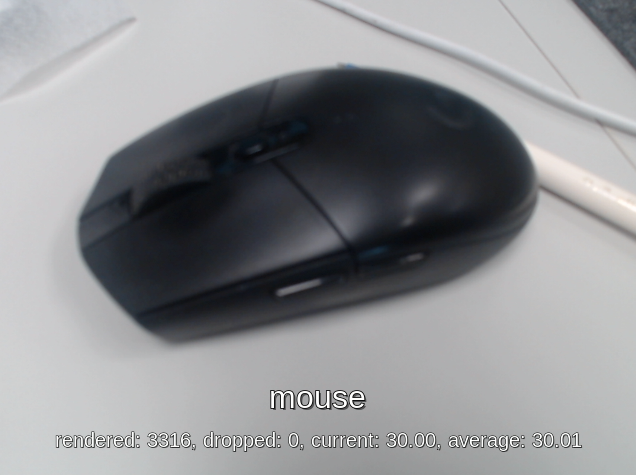
Python script:
/usr/bin/nnstreamer-demo/nnstreamer_example_image_classification.pyRun example:
Set the variable
APPto the Image Classification application:APP=image_classificationChoose the runtime engine:
Online inference with Neuron Stable Delegate (if supported on the platform)
ENGINE=neuron_stableOffline inference with Neuron SDK
ENGINE=neuronsdkCPU-only inference
If no engine is set, the demo falls back to CPU execution.
unset ENGINE # or ENGINE=cpu
Run the command:
Online inference with Neuron Stable Delegate
python3 /usr/bin/nnstreamer-demo/run_nnstreamer_example.py \
    --app $APP --cam_type $CAM_TYPE --cam $CAMERA_NODE_ID \
    --engine neuron_stable --performance $MODE
Offline inference with Neuron SDK
python3 /usr/bin/nnstreamer-demo/run_nnstreamer_example.py \
    --app $APP --cam_type $CAM_TYPE --cam $CAMERA_NODE_ID \
    --engine neuronsdk --performance $MODE
Average inference time
Average inference time of nnstreamer_example_image_classification (UVC) CPU
ARMNN GPU
Neuron Stable
NeuronSDK
Genio-350
46.3
40
Not Supported
Not Supported
Genio-510
8.6
16.5
1.6
2.3
Genio-700
9.4
13
1.3
2.3
Genio-1200
7.3
9
1.8
2.5
Pipeline graph
The following GStreamer pipeline is defined in
nnstreamer_example_image_classification.pywhen--cam uvcand--engine neuronsdkare used. The pipeline graph is generated using thegst-reportcommand from thegst-instrumentstool. For more information, see Pipeline Profiling:gst-launch-1.0 \ v4l2src name=src device=/dev/video5 io-mode=mmap num-buffers=300 ! video/x-raw,width=640,height=480,format=YUY2 ! tee name=t_raw \ t_raw. ! queue ! textoverlay name=tensor_res font-desc=Sans,24 ! fpsdisplaysink sync=false video-sink="waylandsink sync=false fullscreen=0" \ t_raw. ! queue leaky=2 max-size-buffers=2 ! videoconvert ! videoscale ! video/x-raw,width=224,height=224,format=RGB ! tensor_converter ! \ tensor_filter framework=neuronsdk model=/usr/bin/nnstreamer-demo/mobilenet_v1_1.0_224_quant.dla inputtype=uint8 input=3:224:224:1 outputtype=uint8 output=1001:1 ! \ tensor_sink name=tensor_sink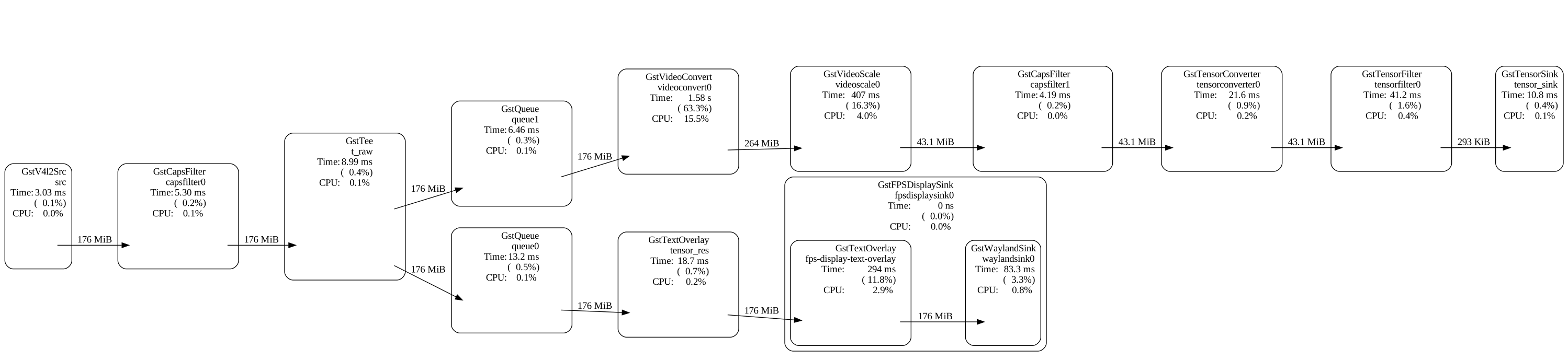
Object Detection
ssd_mobilenet_v2_coco
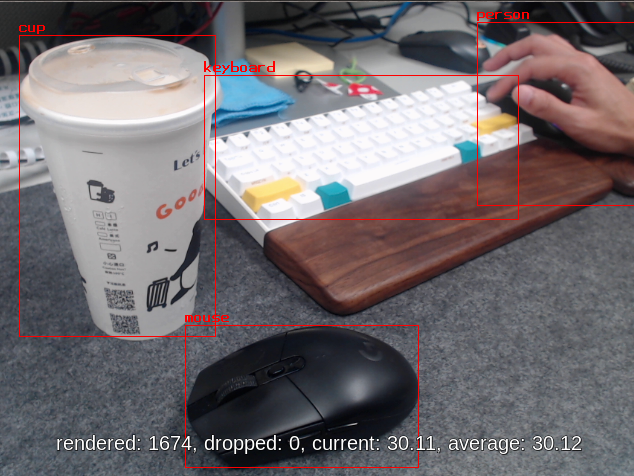
Python script:
/usr/bin/nnstreamer-demo/nnstreamer_example_object_detection.pyModel: ssd_mobilenet_v2_coco.tflite
Run example:
Set the variable
APPto the Object Detection application:APP=object_detectionChoose the runtime engine:
Online inference with Neuron Stable Delegate
ENGINE=neuron_stableOffline inference with Neuron SDK
ENGINE=neuronsdkCPU-only inference
unset ENGINE # or ENGINE=cpu
Run the command:
Online inference with Neuron Stable Delegate
python3 /usr/bin/nnstreamer-demo/run_nnstreamer_example.py \
    --app $APP --cam_type $CAM_TYPE --cam $CAMERA_NODE_ID \
    --engine neuron_stable --performance $MODE
Offline inference with Neuron SDK
python3 /usr/bin/nnstreamer-demo/run_nnstreamer_example.py \
    --app $APP --cam_type $CAM_TYPE --cam $CAMERA_NODE_ID \
    --engine neuronsdk --performance $MODE
Average inference time
Average inference time of nnstreamer_example_object_detection (UVC) CPU
ARMNN GPU
Neuron Steble Delegate
NeuronSDK
Genio-350
579
194.5
Not supported
Not supported
Genio-510
175
79
21.5
22.5
Genio-700
164
60
15.5
16.7
Genio-1200
121
39
12.3
13
Pipeline graph
The following GStreamer pipeline is defined in
nnstreamer_example_object_detections.pywith--cam uvcand--engine neuronsdk. The pipeline graph is generated using thegst-reportcommand fromgst-instruments. For more details, see Pipeline Profiling:gst-launch-1.0 \ v4l2src name=src device=/dev/video5 io-mode=mmap num-buffers=300 ! video/x-raw,width=640,height=480,format=YUY2 ! tee name=t_raw \ t_raw. ! queue leaky=2 max-size-buffers=10 ! compositor name=mix sink_0::zorder=1 sink_1::zorder=2 ! fpsdisplaysink sync=false video-sink="waylandsink sync=false fullscreen=0" \ t_raw. ! queue leaky=2 max-size-buffers=2 ! v4l2convert ! videoscale ! video/x-raw,width=300,height=300,format=RGB ! tensor_converter ! tensor_transform mode=arithmetic option=typecast:float32,add:-127.5,div:127.5 ! queue ! \ tensor_filter framework=neuronsdk model=/usr/bin/nnstreamer-demo/ssd_mobilenet_v2_coco.dla inputtype=float32 input=3:300:300:1 outputtype=float32,float32 output=4:1:1917:1,91:1917:1 ! \ tensor_decoder mode=bounding_boxes option1=mobilenet-ssd option2=/usr/bin/nnstreamer-demo/coco_labels_list.txt option3=/usr/bin/nnstreamer-demo/box_priors.txt option4=640:480 option5=300:300 ! queue leaky=2 max-size-buffers=2 ! mix.
YOLOv5
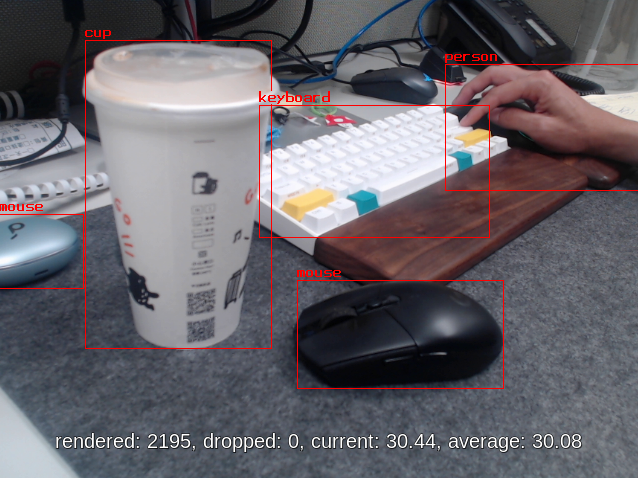
Python script:
/usr/bin/nnstreamer-demo/nnstreamer_example_object_detection_yolov5.pyModel: yolov5s-int8.tflite
Run example:
Set the variable
APPto the Object Detection (YOLOv5s) application:APP=object_detection_yolov5Choose the runtime engine:
Online inference with Neuron Stable Delegate
ENGINE=neuron_stableOffline inference with Neuron SDK
ENGINE=neuronsdkCPU-only inference
unset ENGINE # or ENGINE=cpu
Note
For offline inference, the YOLOv5 model is only supported on MDLA3.0 (Genio-700/510). On MDLA2.0 (Genio-1200), model conversion fails because certain operations are not supported.
ncc-tflite --arch mdla2.0 yolov5s-int8.tflite -o yolov5s-int8.dla --int8-to-uint8
OP[123]: RESIZE_NEAREST_NEIGHBOR
├ MDLA: HalfPixelCenters is unsupported.
├ EDMA: unsupported operation
OP[145]: RESIZE_NEAREST_NEIGHBOR
├ MDLA: HalfPixelCenters is unsupported.
├ EDMA: unsupported operation
ERROR: Cannot find an execution plan because of unsupported operations
ERROR: Fail to compile yolov5s-int8.tflite
As a result, running
run_nnstreamer_example.py --app object_detection_yolov5with--engine neuronsdkfails on Genio-1200:python3 /usr/bin/nnstreamer-demo/run_nnstreamer_example.py --app object_detection_yolov5 --cam_type uvc --cam 130 --engine neuronsdk --performance 1 ... ERROR: Cannot open the file: /usr/bin/nnstreamer-demo/yolov5s-int8.dla ERROR: Cannot set a nullptr compiled network. ERROR: Cannot set compiled network. ERROR: Runtime loadNetworkFromFile fails. ERROR: Cannot initialize runtime pool. ...Run the command:
Online inference with Neuron Stable Delegate
python3 /usr/bin/nnstreamer-demo/run_nnstreamer_example.py \
    --app $APP --cam_type $CAM_TYPE --cam $CAMERA_NODE_ID \
    --engine neuron_stable --performance $MODE
Offline inference with Neuron SDK
python3 /usr/bin/nnstreamer-demo/run_nnstreamer_example.py \
    --app $APP --cam_type $CAM_TYPE --cam $CAMERA_NODE_ID \
    --engine neuronsdk --performance $MODE
Average inference time
Average inference time of nnstreamer_example_object_detection_yolov5 (UVC) CPU
ARMNN GPU
Neuron Stable
NeuronSDK
Genio-350
295
140
Not supported
Not supported
Genio-510
55
46.5
5.2
5.9
Genio-700
57
37.5
3.6
4.9
Genio-1200
41
24.5
27.9
Not supported
Pipeline graph
The following GStreamer pipeline is defined in
nnstreamer_example_object_detection_yolov5.pywhen--cam uvcand--engine neuronsdkare used. The pipeline graph is generated usinggst-reportfromgst-instruments. For more details, see Pipeline Profiling:gst-launch-1.0 \ v4l2src name=src device=/dev/video5 io-mode=mmap num-buffers=300 ! video/x-raw,width=640,height=480,format=YUY2 ! tee name=t_raw \ t_raw. ! queue leaky=2 max-size-buffers=10 ! compositor name=mix sink_0::zorder=1 sink_1::zorder=2 ! fpsdisplaysink sync=false video-sink="waylandsink sync=false fullscreen=0" \ t_raw. ! queue leaky=2 max-size-buffers=2 ! videoconvert ! videoscale ! video/x-raw,width=320,height=320,format=RGB ! tensor_converter ! \ tensor_filter framework=neuronsdk model=/usr/bin/nnstreamer-demo/yolov5s-int8.dla inputtype=uint8 input=3:320:320:1 outputtype=uint8 output=85:6300:1 ! \ other/tensors,num_tensors=1,types=uint8,dimensions=85:6300:1:1,format=static ! \ tensor_transform mode=arithmetic option=typecast:float32,add:-4.0,mul:0.0051498096 ! \ tensor_decoder mode=bounding_boxes option1=yolov5 option2=/usr/bin/nnstreamer-demo/coco.txt option3=0 option4=640:480 option5=320:320 ! queue leaky=2 max-size-buffers=2 ! mix.
Pose Estimation
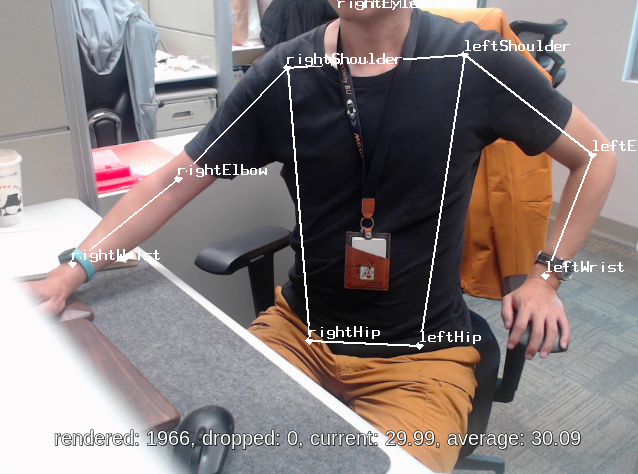
Python script:
/usr/bin/nnstreamer-demo/nnstreamer_example_pose_estimation.pyModel: posenet_mobilenet_v1_100_257x257_multi_kpt_stripped.tflite
Run example:
Set the variable
APPto the Pose Estimation application:APP=pose_estimationChoose the runtime engine:
Online inference with Neuron Stable Delegate
ENGINE=neuron_stableOffline inference with Neuron SDK
ENGINE=neuronsdkCPU-only inference
unset ENGINE # or ENGINE=cpu
Run the command:
Online inference with Neuron Stable Delegate
python3 /usr/bin/nnstreamer-demo/run_nnstreamer_example.py \
    --app $APP --cam_type $CAM_TYPE --cam $CAMERA_NODE_ID \
    --engine neuron_stable --performance $MODE
Offline inference with Neuron SDK
python3 /usr/bin/nnstreamer-demo/run_nnstreamer_example.py \
    --app $APP --cam_type $CAM_TYPE --cam $CAMERA_NODE_ID \
    --engine neuronsdk --performance $MODE
Average inference time
Average inference time of nnstreamer_example_pose_estimation (UVC) CPU
ARMNN GPU
Neuron Stable
NeuronSDK
Genio-350
180
115.3
Not supported
Not supported
Genio-510
45
34.5
6.9
8.3
Genio-700
50
25
5.2
6.5
Genio-1200
42
16.5
5.7
6.5
Pipeline graph
The following GStreamer pipeline is defined in
nnstreamer_example_pose_estimation.pywith--cam uvcand--engine neuronsdk. The pipeline graph is generated usinggst-reportfromgst-instruments. For details, see Pipeline Profiling:gst-launch-1.0 \ v4l2src name=src device=/dev/video5 io-mode=mmap num-buffers=300 ! video/x-raw,width=640,height=480,format=YUY2 ! tee name=t_raw \ t_raw. ! queue leaky=2 max-size-buffers=10 ! compositor name=mix sink_0::zorder=1 sink_1::zorder=2 ! fpsdisplaysink sync=false video-sink="waylandsink sync=false fullscreen=0" \ t_raw. ! queue leaky=2 max-size-buffers=2 ! videoconvert ! videoscale ! video/x-raw,width=257,height=257,format=RGB ! tensor_converter ! tensor_transform mode=arithmetic option=typecast:float32,add:-127.5,div:127.5 ! queue ! \ tensor_filter framework=neuronsdk model=/usr/bin/nnstreamer-demo/posenet_mobilenet_v1_100_257x257_multi_kpt_stripped.dla inputtype=float32 input=3:257:257:1 outputtype=float32,float32,float32,float32 output=17:9:9:1,34:9:9:1,32:9:9:1,32:9:9:1 ! queue ! \ tensor_decoder mode=pose_estimation option1=640:480 option2=257:257 option3=/usr/bin/nnstreamer-demo/point_labels.txt option4=heatmap-offset ! queue leaky=2 max-size-buffers=2 ! mix.
Face Detection
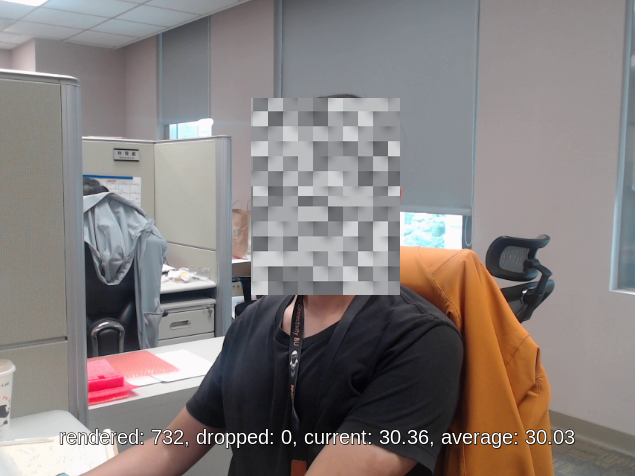
Python script:
/usr/bin/nnstreamer-demo/nnstreamer_example_face_detection.pyModel: detect_face.tflite
Run example:
Set the variable
APPto the Face Detection application:APP=face_detectionChoose the runtime engine:
Online inference with Neuron Stable Delegate
ENGINE=neuron_stableOffline inference with Neuron SDK
ENGINE=neuronsdkCPU-only inference
unset ENGINE # or ENGINE=cpu
Run the command:
Online inference with Neuron Stable Delegate
python3 /usr/bin/nnstreamer-demo/run_nnstreamer_example.py \
    --app $APP --cam_type $CAM_TYPE --cam $CAMERA_NODE_ID \
    --engine neuron_stable --performance $MODE
Offline inference with Neuron SDK
python3 /usr/bin/nnstreamer-demo/run_nnstreamer_example.py \
    --app $APP --cam_type $CAM_TYPE --cam $CAMERA_NODE_ID \
    --engine neuronsdk --performance $MODE
Average inference time
Average inference time of nnstreamer_example_face_detection (UVC) CPU
ARMNN GPU
Neuron Stable
NeuronSDK
Genio-350
237
113.2
Not support
Not support
Genio-510
83
41.8
11.2
12.5
Genio-700
60
31
7.8
9.1
Genio-1200
52
23.4
5.9
6.8
Pipeline graph
The following GStreamer pipeline is defined in
nnstreamer_example_face_detection.pywith--cam uvcand--engine neuronsdk. The pipeline graph is generated usinggst-reportfromgst-instruments. For details, see Pipeline Profiling:gst-launch-1.0 \ v4l2src name=src device=/dev/video5 io-mode=mmap num-buffers=300 ! video/x-raw,width=640,height=480,format=YUY2 ! tee name=t_raw \ t_raw. ! queue leaky=2 max-size-buffers=10 ! videoconvert ! cairooverlay name=tensor_res ! fpsdisplaysink sync=false video-sink="waylandsink sync=false fullscreen=0" \ t_raw. ! queue leaky=2 max-size-buffers=2 ! videoconvert ! videoscale ! video/x-raw,width=300,height=300,format=RGB ! tensor_converter ! tensor_transform mode=arithmetic option=typecast:float32,add:-127.5,div:127.5 ! \ tensor_filter framework=neuronsdk model=/usr/bin/nnstreamer-demo/detect_face.dla inputtype=float32 input=3:300:300:1 outputtype=float32,float32 output=4:1:1917:1,2:1917:1 ! \ tensor_sink name=res_face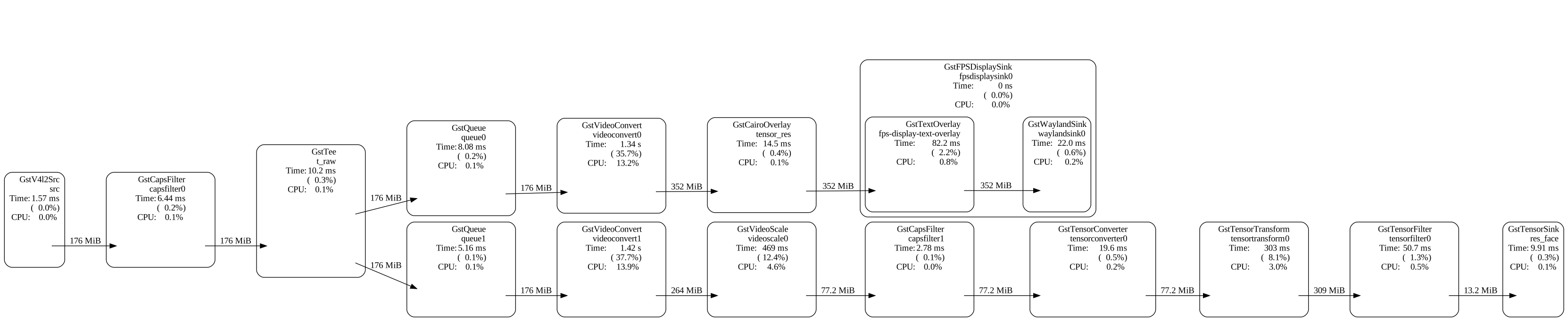
Monocular Depth Estimation
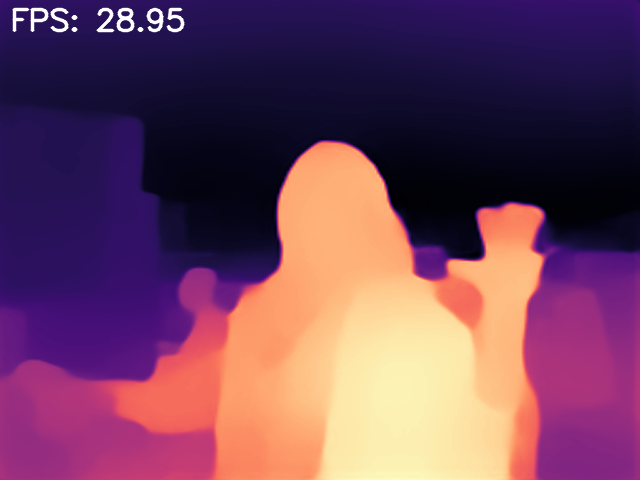
Python script:
/usr/bin/nnstreamer-demo/nnstreamer_example_monocular_depth_estimation.pyModel: midas.tflite
Run example:
Set the variable
APPto the Monocular Depth Estimation application:APP=monocular_depth_estimationChoose the runtime engine:
Online inference with Neuron Stable Delegate
ENGINE=neuron_stableOffline inference with Neuron SDK
ENGINE=neuronsdkCPU-only inference
unset ENGINE # or ENGINE=cpu
Run the command:
Online inference with Neuron Stable Delegate
python3 /usr/bin/nnstreamer-demo/run_nnstreamer_example.py \
    --app $APP --cam_type $CAM_TYPE --cam $CAMERA_NODE_ID \
    --engine neuron_stable --performance $MODE
Offline inference with Neuron SDK
python3 /usr/bin/nnstreamer-demo/run_nnstreamer_example.py \
    --app $APP --cam_type $CAM_TYPE --cam $CAMERA_NODE_ID \
    --engine neuronsdk --performance $MODE
Average inference time
Average inference time of nnstreamer_example_monocular_depth_estimation (UVC) CPU
ARMNN GPU
Neuron Stable
NeuronSDK
Genio-350
701
350
Not supported
Not supported
Genio-510
240
120
22.7
23.2
Genio-700
158
87
16.3
16.5
Genio-1200
144
62
33.3
Not supported
Pipeline graph
The following GStreamer pipeline is defined in
nnstreamer_example_monocular_depth_estimation.pywhen--cam uvcand--engine neuronsdkare used. The pipeline graph is generated usinggst-reportfromgst-instruments. For more information, see Pipeline Profiling:gst-launch-1.0 \ v4l2src name=src device=/dev/video5 ! video/x-raw,format=YUY2,width=640,height=480 num-buffers=300 ! videoconvert ! videoscale ! \ video/x-raw,format=RGB,width=256,height=256 ! tensor_converter ! tensor_transform mode=arithmetic option=typecast:float32,add:-127.5,div:127.5 ! \ tensor_filter latency=1 framework=neuronsdk throughput=0 model=/usr/bin/nnstreamer-demo/midas.dla inputtype=float32 input=3:256:256:1 outputtype=float32 output=1:256:256:1 ! \ appsink name=sink emit-signals=True max-buffers=1 drop=True sync=False
Image-Input Application
A Portable Network Graphics (PNG) file is required as the input source for the following demonstrations.
General Configuration
The image-based examples share a common configuration pattern. Developers can switch the application while keeping the base configuration unchanged.
The following settings enable Performance Mode and configure the input image:
IMAGE_PATH=/usr.bin/nnstreamer-demo/original.png
IMAGE_WIDTH=600
IMAGE_HEIGHT=400
MODE=1
Low Light Image Enhancement

Python script:
/usr/bin/nnstreamer-demo/nnstreamer_example_low_light_image_enhancement.pyModel: lite-model_zero-dce_1.tflite
Run example:
The example image (
/usr/bin/nnstreamer-demo/original.png) is downloaded from paperswithcode (LOL dataset).Set the variable
APPto the Low Light Image Enhancement application:APP=low_light_image_enhancementChoose the runtime engine:
Online inference with Neuron Stable Delegate
ENGINE=neuron_stableOffline inference with Neuron SDK
ENGINE=neuronsdkCPU-only inference
unset ENGINE # or ENGINE=cpu
Run the command:
Online inference with Neuron Stable Delegate
python3 /usr/bin/nnstreamer-demo/run_nnstreamer_example.py \
    --app $APP --img $IMAGE_PATH --width $IMAGE_WIDTH --height $IMAGE_HEIGHT \
    --engine neuron_stable --performance $MODE
Offline inference with Neuron SDK
python3 /usr/bin/nnstreamer-demo/run_nnstreamer_example.py \
    --app $APP --img $IMAGE_PATH --width $IMAGE_WIDTH --height $IMAGE_HEIGHT \
    --engine neuronsdk --performance $MODE
The enhanced image is saved under
/usr/bin/nnstreamer-demoand named aslow_light_enhancement_${ENGINE}.png. Developers can also use the--exportoption in the script to customize the output filename.
Average inference time
Average inference time of nnstreamer_example_low_light_image_enhancement CPU
ARMNN GPU
Neuron Stable
NeuronSDK
Genio-350
3636
Not supported
Not supported
Not supported
Genio-510
1215
Not supported
229
101
Genio-700
765
Not supported
147
74
Genio-1200
644
Not supported
144
79
Pipeline graph
The following GStreamer pipeline is defined in
nnstreamer_example_low_light_image_enhancement.pywhen--engine neuronsdkis used. The pipeline graph is generated usinggst-reportfromgst-instruments. For more details, see Pipeline Profiling:gst-launch-1.0 \ filesrc location=/usr/bin/nnstreamer-demo/original.png ! pngdec ! videoscale ! videoconvert ! video/x-raw,width=600,height=400,format=RGB ! \ tensor_converter ! tensor_transform mode=arithmetic option=typecast:float32,add:0,div:255.0 ! \ tensor_filter framework=neuronsdk model=/usr/bin/nnstreamer-demo/lite-model_zero-dce_1.dla inputtype=float32 input=3:600:400:1 outputtype=float32 output=3:600:400:1 ! \ tensor_sink name=tensor_sink
Performance
Inference Time – tensor_filter Invoke Time
The inference time for each example is measured using the latency property of tensor_filter.
The property is defined in the tensor_filter_common.c source code:
Turn on performance profiling for the average latency over the recent 10 inferences in microseconds.
Currently, this accepts either 0 (OFF) or 1 (ON). By default, it's set to 0 (OFF).
To enable latency profiling, modify each Python example and add latency=1 to the tensor_filter properties.
The following example uses nnstreamer_example_image_classification.py:
Edit the script
nnstreamer_example_image_classification.py.Locate
tensor_filterand addlatency=1:if engine == 'neuronsdk': tensor = dla_converter(self.tflite_model, self.dla) cmd += f'tensor_filter latency=1 framework=neuronsdk model={self.dla} {tensor} ! ' elif engine == 'neuron_stable': cmd += f'tensor_filter latency=1 framework=tensorflow-lite model={self.tflite_model} custom=Delegate:Stable,StaDelegateSettingFile:/usr/share/label_image/stable_delegate_settings.json ! ' else: # CPU-only fallback cpu_cores = find_cpu_cores() cmd += f'tensor_filter latency=1 framework=tensorflow-lite model={self.tflite_model} custom=NumThreads:{cpu_cores} ! 'Save the script.
Set the glib log level to
allto print the timing messages:export G_MESSAGES_DEBUG=allRun the example. The log output includes entries similar to
Invoke took 2.537 ms, which indicate the measured inference time.CAM_TYPE=uvc CAMERA_NODE_ID=130 MODE=1 ENGINE=neuronsdk python3 /usr/bin/nnstreamer-demo/run_nnstreamer_example.py \ --app image_classification --cam_type $CAM_TYPE --cam $CAMERA_NODE_ID \ --engine $ENGINE --performance $MODE ... ** INFO: 03:16:01.589: [/usr/bin/nnstreamer-demo/mobilenet_v1_1.0_224_quant.dla] Invoke took 2.537 ms ...
NNStreamer Advanced Pipeline Examples
Pipeline Profiling
IoT Yocto includes gst-instruments as a profiling tool for performance analysis and data flow inspection of GStreamer pipelines.
The two main utilities are:
gst-top-1.0:Shows a performance report for each element in a pipeline.
gst-top-1.0 \
  gst-launch-1.0 \
  v4l2src name=src device=/dev/video5 io-mode=mmap num-buffers=300 ! video/x-raw,width=640,height=480,format=YUY2 ! tee name=t_raw t_raw. ! queue leaky=2 max-size-buffers=10 ! \
...

Got EOS from element "pipeline0".
Execution ended after 0:00:10.221403924
Setting pipeline to NULL ...
Freeing pipeline ...
ELEMENT                    %CPU   %TIME   TIME
videoconvert0               13.8   55.3    1.41 s
videoscale0                  3.7   14.9    379 ms
tensortransform0             2.2    9.0    228 ms
fps-display-text-overlay     2.0    8.1    207 ms
tensordecoder0               0.7    2.8   71.9 ms
tensorfilter0                0.6    2.3   59.5 ms
...
The tool also saves the statistics to a GstTrace file named
gst-top.gsttrace:ls -al *.gsttrace -rw-r--r-- 1 root root 11653120 Jan 4 05:23 gst-top.gsttracegst-report:Converts a GstTrace file into a performance graph in DOT format:
gst-report-1.0 --dot gst-top.gsttrace | dot -Tsvg > perf.svgThe figure below shows the performance graph for
nnstreamer_example_object_detection.py. It displays CPU usage, time usage, and execution time for each element. This makes it easy to identify the elements that consume most of the CPU or execution time.In this example,
tensor_transformconsumes 56.9% of the total execution time because it performs buffer data conversion on the CPU.
Note
For more information, refer to NNStreamer online documentation: Profiling.