Example: Pruning the Model
This page provides a example on model pruning if the model contains operators or data types not supported when doing the model compilation. For more discussions about Genio AI, refer to the Genio Community.
Unsupported Operations in DLA Conversion
If ncc-tflite reports unsupported operation errors while converting a TFLite model to DLA format, the model may need pruning or structural adjustments.
In many cases, the solution is to:
Identify unsupported operations, including their parameters and tensor shapes.
Modify or prune those operations.
Regenerate the TFLite model and re-run the conversion.
Example Error Message
The following example shows a typical error when converting a TFLite model to DLA format:
ncc-tflite --arch=mdla3.0 yolox_s_quant.tflite
OP[2]: STRIDED_SLICE
 ├ MDLA: Last stride size should be equal to 1
 ├ EDMA: unsupported operation
 ├ EDMA: unsupported operation
OP[3]: STRIDED_SLICE
 ├ MDLA: Last stride size should be equal to 1
 ├ EDMA: unsupported operation
 ├ EDMA: unsupported operation
OP[4]: STRIDED_SLICE
 ├ MDLA: Last stride size should be equal to 1
 ├ EDMA: unsupported operation
 ├ EDMA: unsupported operation
OP[5]: STRIDED_SLICE
 ├ MDLA: Last stride size should be equal to 1
 ├ EDMA: unsupported operation
 ├ EDMA: unsupported operation
ERROR: Cannot find an execution plan because of unsupported operations
ERROR: Fail to compile yolox_s_quant.tflite
Note
In this example:
The
STRIDED_SLICEoperation appears multiple times (OP[2], OP[3], OP[4], OP[5]), and each instance fails for the same reason.On MDLA, the last stride does not meet the requirement “Last stride size must be equal to 1”, so the operation is unsupported.
On EDMA,
STRIDED_SLICEis not supported at all.Because the converter cannot find a valid execution plan, the compilation fails.
To resolve this, modify or prune the unsupported STRIDED_SLICE operations, or adjust stride settings so that they satisfy the MDLA requirements, and then retry DLA conversion.
1. Inspect the Model
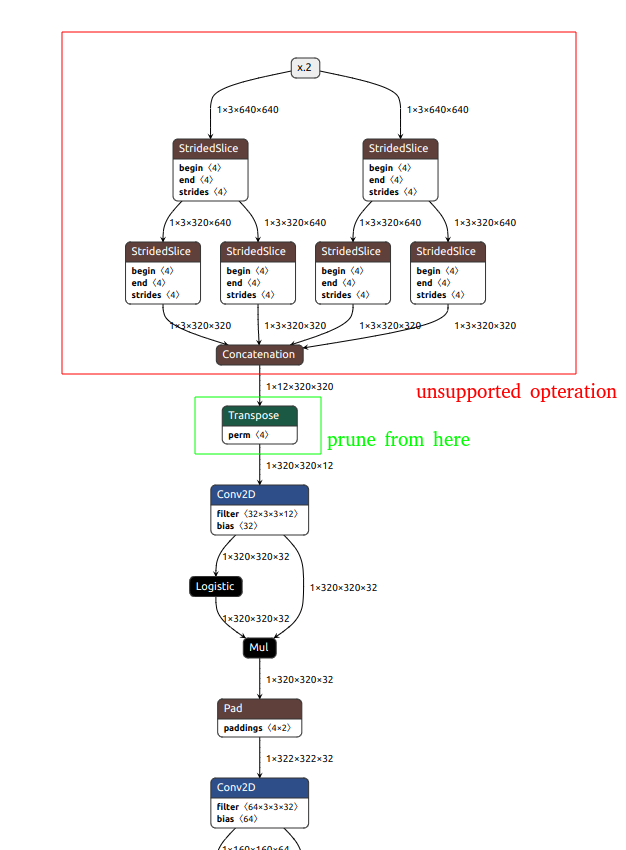
Use a visualization tool such as Netron to inspect:
Input and output tensors.
Internal layers, including operations that
ncc-tflitereports as unsupported.Tensor dimensions and data types.
Focus on operations listed in the
ncc-tfliteerror log (in the example above,STRIDED_SLICE).
2. Prune or Rewrite the Model
After locating unsupported operations, prune or reshape the model so it becomes compatible with DLA.
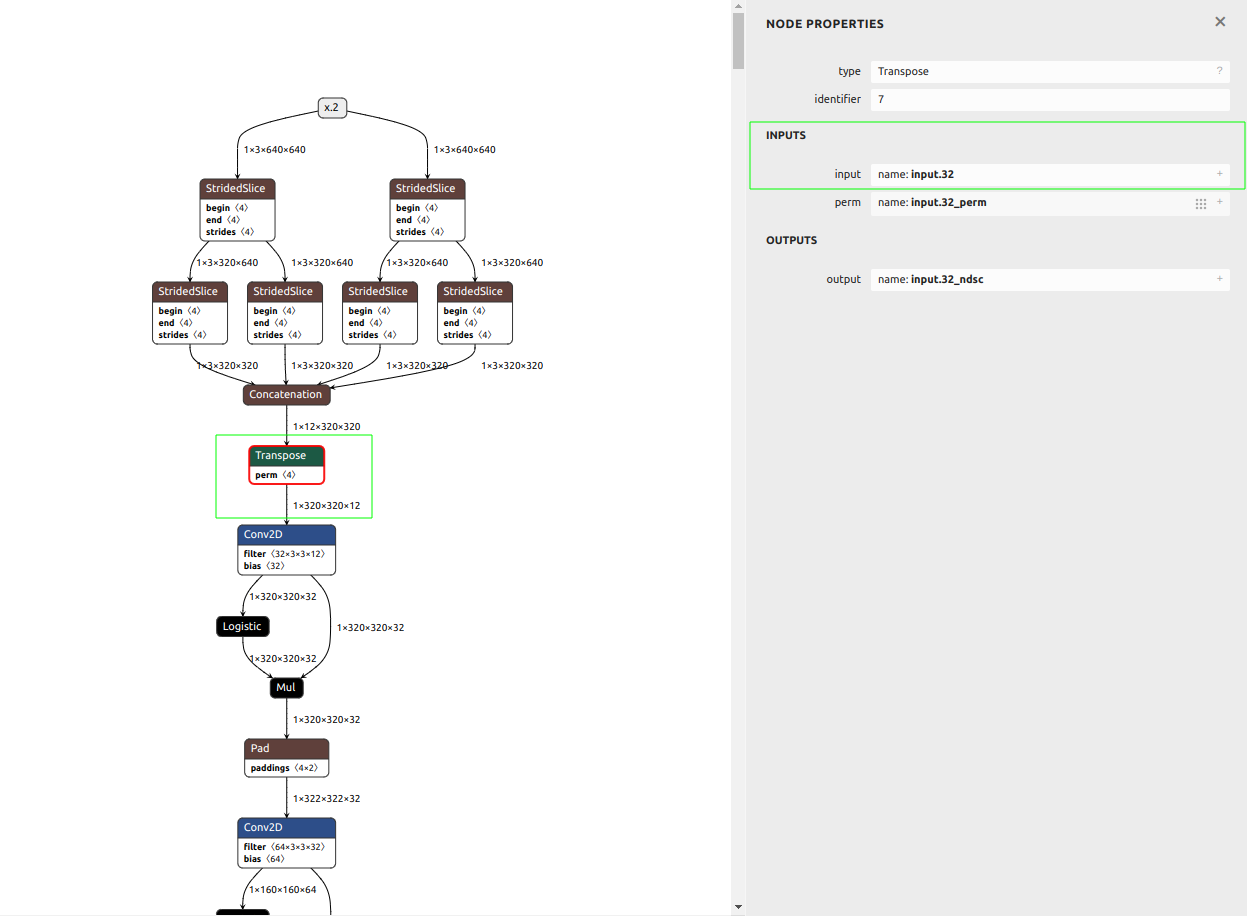
One option is to use the TFLiteEditor class from mtk_converter to export a subgraph that excludes unsupported operations or simplifies the network structure.
Example script:
import mtk_converter

editor = mtk_converter.TFLiteEditor("yolox_s_quant.tflite")
output_file = "yolox_s_quant_7-303.tflite"
input_names = ["input.32"]
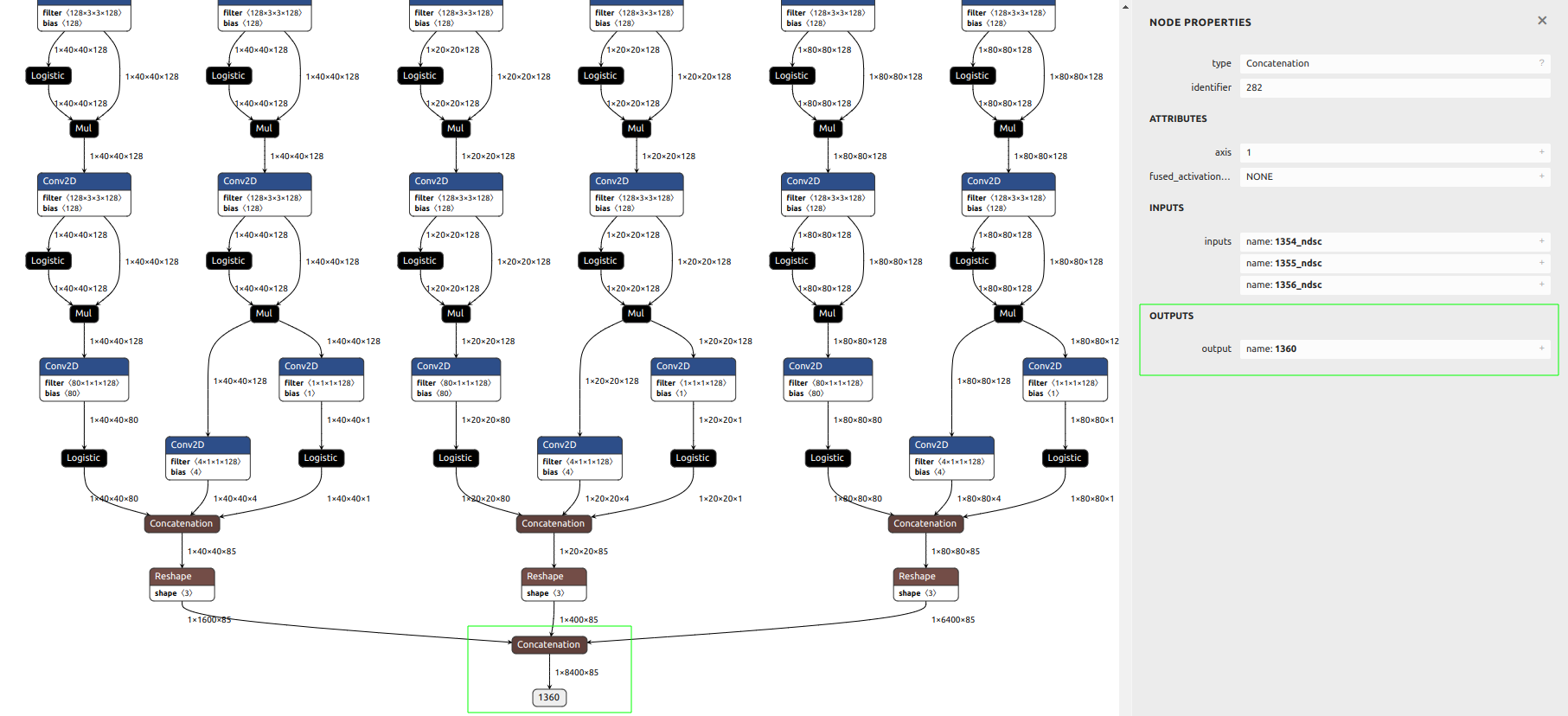
output_names = ["1360"]

_ = editor.export(
    output_file=output_file,
    input_names=input_names,
    output_names=output_names,
)
This example exports a subgraph whose input tensor is input.32 and output tensor is 1360.
Note
The values of input_names and output_names are specific to this model.
Always determine the correct tensor names for your own model by checking:
The TFLite graph in Netron, and
The
ncc-tflite --show-io-infooutput, where applicable.
3. Validate the Pruned Model
After pruning or rewriting the model:
Run inference with the pruned TFLite model.
Compare results against the original model on a small set of representative inputs.
Confirm that accuracy degradation is acceptable for your use case.
Only after this validation step is complete should the pruned model be used to generate the DLA file with ncc-tflite.
Supported Model Formats for ncc-tflite
The ncc-tflite tool accepts only TensorFlow Lite models as input.
Supported format
.tflite(TensorFlow Lite FlatBuffer format)
If the original model is created in another framework, convert it to TFLite before using ncc-tflite.
Common conversion flows include:
PyTorch → ONNX → TensorFlow → TFLite
TensorFlow SavedModel → TFLite
ONNX → TensorFlow → TFLite
For official guidance and examples, refer to the TensorFlow and framework‑specific documentation.
Verifying Supported Operators
To check whether the operators in your TFLite model are supported by ncc-tflite, use:
./ncc-tflite --show-builtin-ops
./ncc-tflite --show-mtkext-ops
The output lists:
Built‑in TFLite operations supported by
ncc-tflite.MediaTek extension operations (MTKEXT) supported by
ncc-tflite.
Compare these lists with the operators used in your model (as shown by tools such as Netron or ncc-tflite --show-tflite) to identify potential incompatibilities before starting a full conversion.